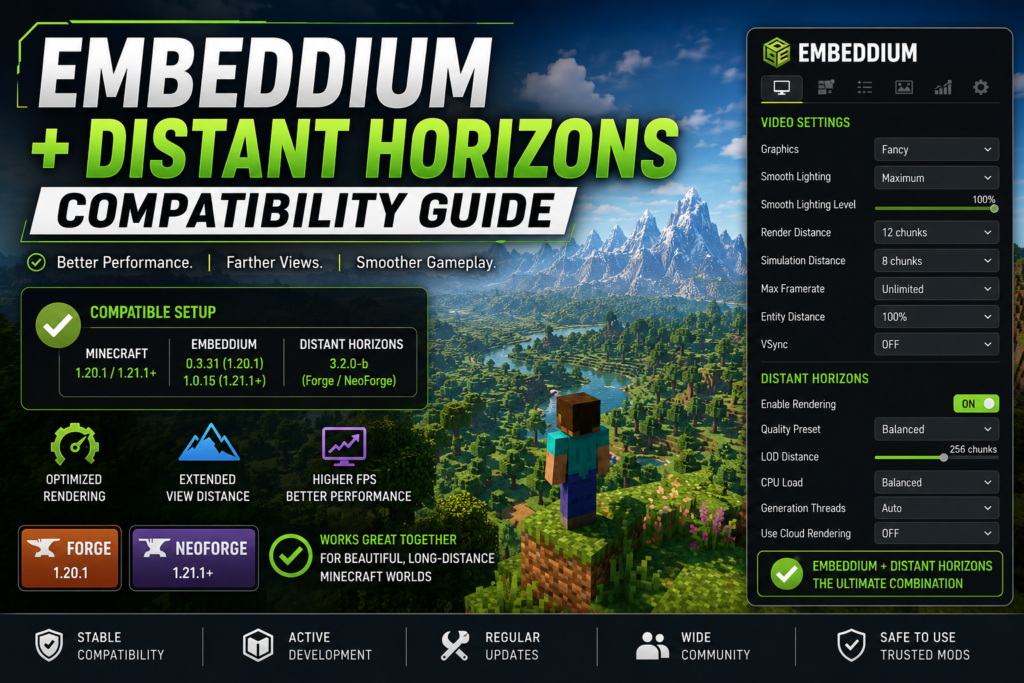
Embeddium and Distant Horizons can be used together to improve Minecraft performance while displaying simplified terrain far beyond the normal render distance. Embeddium optimizes the game’s rendering system, while Distant Horizons generates level-of-detail terrain, commonly called LODs, for distant areas.
Compatibility depends on more than simply placing both files in the mods folder. Minecraft version, mod loader, Embeddium version, Distant Horizons version, graphics hardware, shaders, and other rendering mods must all match. This guide explains the safest setup, recommended settings, shader requirements, and solutions for crashes, missing LODs, transparent chunks, and visual seams.
Quick Answer: Does Embeddium Work With Distant Horizons?
Yes, Embeddium and Distant Horizons can work together when both files support the same Minecraft version and mod loader.
Embeddium officially supports Forge on Minecraft 1.20.1 and older, while Fabric and NeoForge builds are available for Minecraft 1.20.1 and newer. Distant Horizons provides builds for Fabric, Forge, and NeoForge across multiple Minecraft versions.
Two commonly used combinations are:
| Minecraft | Loader | Embeddium | Distant Horizons | Status |
|---|---|---|---|---|
| 1.20.1 | Forge | 0.3.31 | 3.2.0-b | Compatible base setup |
| 1.21.1 | NeoForge | 1.0.15 | 3.2.0-b | Compatible base setup |
Embeddium 0.3.31 officially supports Minecraft 1.20.1 on Forge and NeoForge, while Embeddium 1.0.15 supports Minecraft 1.21.1 on NeoForge. Distant Horizons 3.2.0-b has separate official builds for Forge 1.20.1 and NeoForge 1.21.1.
These combinations describe matching official files, but they do not guarantee that every shader pack, GPU driver, launcher, resource pack, or large modpack will work without adjustment.
What Do Embeddium and Distant Horizons Do?
Embeddium and Distant Horizons affect different parts of Minecraft rendering.
Embeddium
Embeddium is a client-side performance mod based on the open-source Sodium rendering codebase. It replaces and optimizes several parts of Minecraft’s terrain and immediate-mode rendering systems. It also includes fixes and integration APIs intended to improve compatibility with other mods.
Embeddium mainly helps with:
- Rendering nearby chunks
- Improving frame consistency
- Reducing rendering overhead
- Optimizing entities, block entities, and interfaces
- Providing additional video settings
- Improving compatibility with Forge and NeoForge modpacks
Distant Horizons
Distant Horizons extends visible terrain beyond Minecraft’s normal render distance by creating simplified LOD representations. These LODs contain less detail than fully loaded chunks, allowing much more distant terrain to remain visible.
It does not simply increase the normal Minecraft render-distance slider. Nearby terrain is still handled as regular chunks, while distant areas use simplified data.
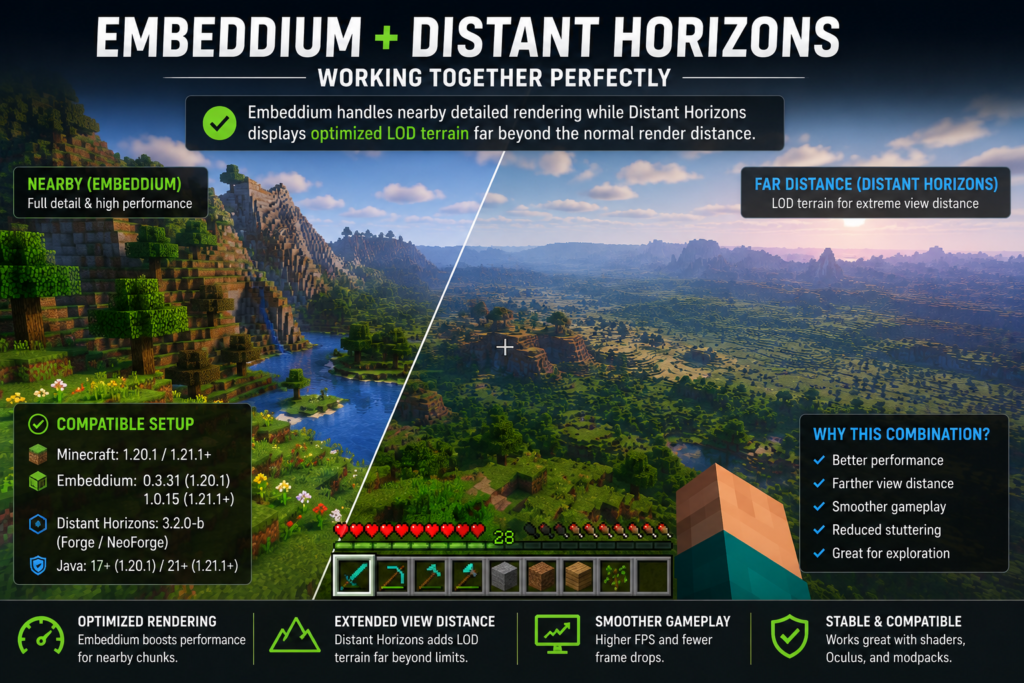
Using the two mods together can create a useful balance:
- Embeddium handles nearby detailed rendering
- Distant Horizons handles distant simplified terrain
- Normal render distance can remain moderate
- Long-distance visibility can remain high
Embeddium and Distant Horizons Version Compatibility
The most important compatibility rule is that every file must target the same Minecraft version and loader.
Do not mix:
- A Minecraft 1.20.1 mod with Minecraft 1.21.1
- A Forge file with a Fabric installation
- A NeoForge file with a regular Forge profile
- Multiple Embeddium files
- Multiple Distant Horizons files
- Rubidium, Sodium, OptiFine, and Embeddium in the same test profile
Before downloading anything, check the full Embeddium Compatible Minecraft Versions guide.
Recommended Forge 1.20.1 Combination
For a Forge 1.20.1 profile, the matching core files are:
- Minecraft 1.20.1
- Forge 47.x
- Java 17
- Embeddium 0.3.31
- Distant Horizons 3.2.0-b for Minecraft 1.20.1
- Oculus 1.8.0 only when shaders are required
The official Embeddium release page lists 0.3.31+mc1.20.1 for Forge and NeoForge. The Distant Horizons 3.2.0-b file supports Minecraft 1.20.1 on Forge and Fabric. Oculus 1.8.0 supports Minecraft 1.20.1 and specifically lists improved compatibility with Distant Horizons 2.2 and newer.
Use the complete Embeddium Forge 1.20.1 installation guide if Embeddium is not installed yet.
Recommended NeoForge 1.21.1 Combination
For a NeoForge 1.21.1 profile, use:
- Minecraft 1.21.1
- A matching NeoForge build
- Java 21
- Embeddium 1.0.15
- Distant Horizons 3.2.0-b for Minecraft 1.21.1
The official pages list Embeddium 1.0.15 for Minecraft 1.21.1 NeoForge and Distant Horizons 3.2.0-b for Minecraft 1.21.1 Fabric and NeoForge.
Follow the Embeddium NeoForge 1.21.1 installation guide for the initial profile setup.
What About Minecraft 1.21.4?
Do not assume that a file intended for Minecraft 1.21.1 will work on 1.21.4. Minecraft point releases can change rendering APIs, loader requirements, and dependency versions.
Check the dedicated Embeddium 1.21.4 Compatibility Guide before building a 1.21.4 profile.
System Requirements
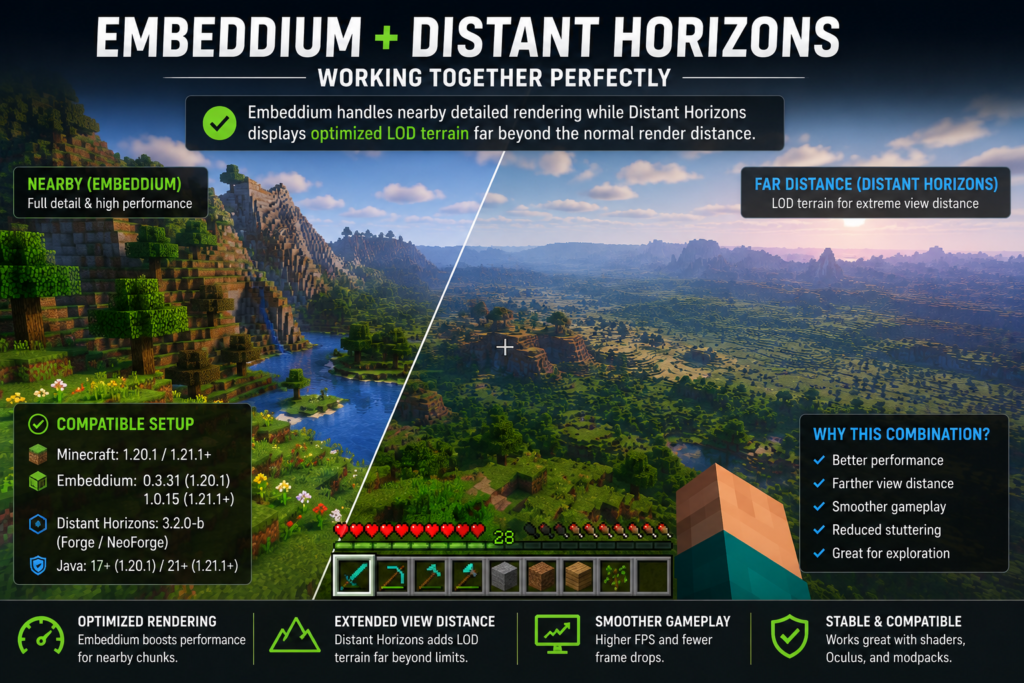
Running Embeddium alone is generally less demanding than running Embeddium together with large Distant Horizons distances. Distant Horizons must generate, save, load, and render additional LOD data.
Recommended Starting Requirements
| Component | Recommended Starting Point |
| CPU | Modern four-core processor or better |
| RAM allocation | 4–6 GB for a light setup |
| Large modpack RAM | 6–8 GB when justified |
| GPU | OpenGL 3.3-compatible graphics |
| Storage | SSD recommended |
| Java | Java 17 for 1.20.1; Java 21 for 1.21.1 |
| Drivers | Current manufacturer-provided GPU drivers |
Distant Horizons 3.2.0-b Increased its minimum OpenGL requirement from 3.2 to 3.3. Its release notes also mention fixes for memory, viewport, AMD rendering, and buffers.
Allocating excessive RAM does not automatically improve performance. Start with a reasonable amount and increase it only when logs or memory usage show that it is necessary.
How to Install Embeddium With Distant Horizons
Create a backup before changing an existing modpack.
Step 1: Confirm the Minecraft Version
Open the launcher profile and check the exact Minecraft version.
Examples:
- Minecraft 1.20.1
- Minecraft 1.21.1
Do not rely only on the folder name. Launch the game once and confirm the version shown on the title screen or Mods page.
Step 2: Confirm the Loader
Determine whether the profile uses:
- Forge
- NeoForge
- Fabric
Embeddium is not used in the same way across all loaders and Minecraft releases. Forge support is primarily associated with Minecraft 1.20.1 and older, while newer releases commonly use NeoForge or Fabric builds.
Step 3: Install Embeddium
Place one matching Embeddium JAR inside the profile’s mods folder.
Do not leave an older Embeddium file beside the new one.
Step 4: Install Distant Horizons
Download the Distant Horizons file that matches both:
- Your Minecraft version
- Your mod loader
Place the JAR in the same profile’s mods folder.
Step 5: Remove Overlapping Renderers
For the first test, remove or disable:
- Rubidium
- Sodium on a Forge Embeddium profile
- OptiFine
- Duplicate Embeddium files
- Duplicate Distant Horizons files
- Experimental renderer replacements
Oculus can remain installed when using shaders, but the safest first launch is without shaders.
Step 6: Launch Without Shaders
Start Minecraft with:
- Embeddium enabled
- Distant Horizons enabled
- Shaders disabled
- Default resource pack
- Moderate video settings
Create a new test world or use a backed-up world. Move through several chunks and allow time for LOD generation.
Step 7: Add Other Mods Gradually
Once the base combination works, add optional visual and performance mods one at a time.
This makes it much easier to identify the exact mod responsible if rendering problems return.
Recommended Embeddium Settings for Distant Horizons
Embeddium’s normal render distance and Distant Horizons’ LOD distance should not both be set excessively high.
A practical starting configuration is:
| Setting | Suggested Starting Value |
| Minecraft render distance | 8–12 chunks |
| Simulation distance | 6–8 chunks |
| Distant Horizons distance | 128–256 blocks/chunks according to its interface |
| Graphics quality | Fast or Fancy |
| VSync | Optional |
| Chunk update threads | Default or automatic |
| Entity distance | 75–100% |
| Clouds | Disable one cloud system if duplicated |
| Distant Horizons quality | Low or Medium initially |
The exact Distant Horizons distance unit and available options can differ between releases. Begin with the default profile before changing advanced settings.
For weaker systems, use the Best Embeddium Settings for Low-End PCs as the performance baseline.
For stronger hardware, consult the Best Embeddium Settings for Maximum FPS, but do not combine maximum normal render distance with extreme Distant Horizons distances during the first test.
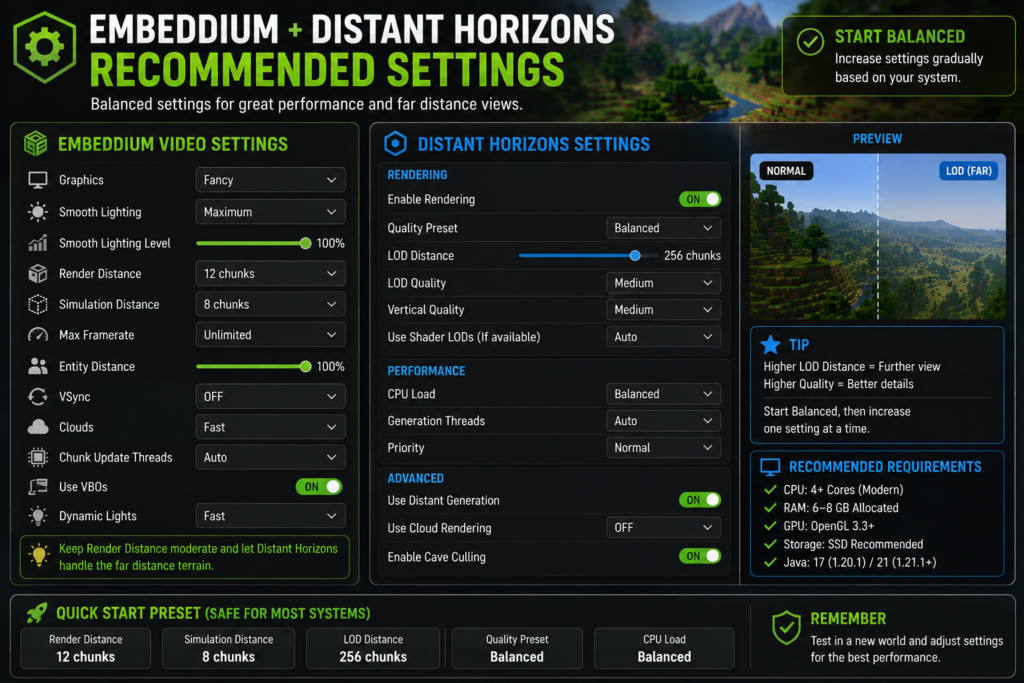
Best Distant Horizons Settings to Start With
The safest configuration is not necessarily the highest possible distance. LOD generation can create significant CPU, memory, and storage activity, especially when entering unexplored terrain.
Low-End System Preset
- Minecraft render distance: 6–8
- Simulation distance: 5–6
- Distant Horizons quality: Low
- LOD distance: 64–128
- CPU load: Low
- Generation threads: Low or default
- Shaders: Off
- Resource packs: Default
Balanced Preset
- Minecraft render distance: 10–12
- Simulation distance: 6–8
- Distant Horizons quality: Medium
- LOD distance: 128–256
- CPU load: Balanced
- Generation threads: Default
- Shaders: Test only after base stability
High-End Preset
- Minecraft render distance: 12–16
- Simulation distance: 8–10
- Distant Horizons quality: Medium or High
- LOD distance: 256 or higher
- CPU load: Medium or High
- Shaders: Compatible pack only
- Storage: SSD strongly preferred
Increase only one major setting at a time. This helps determine whether a performance drop comes from normal chunks, LOD distance, LOD quality, shaders, or world generation.
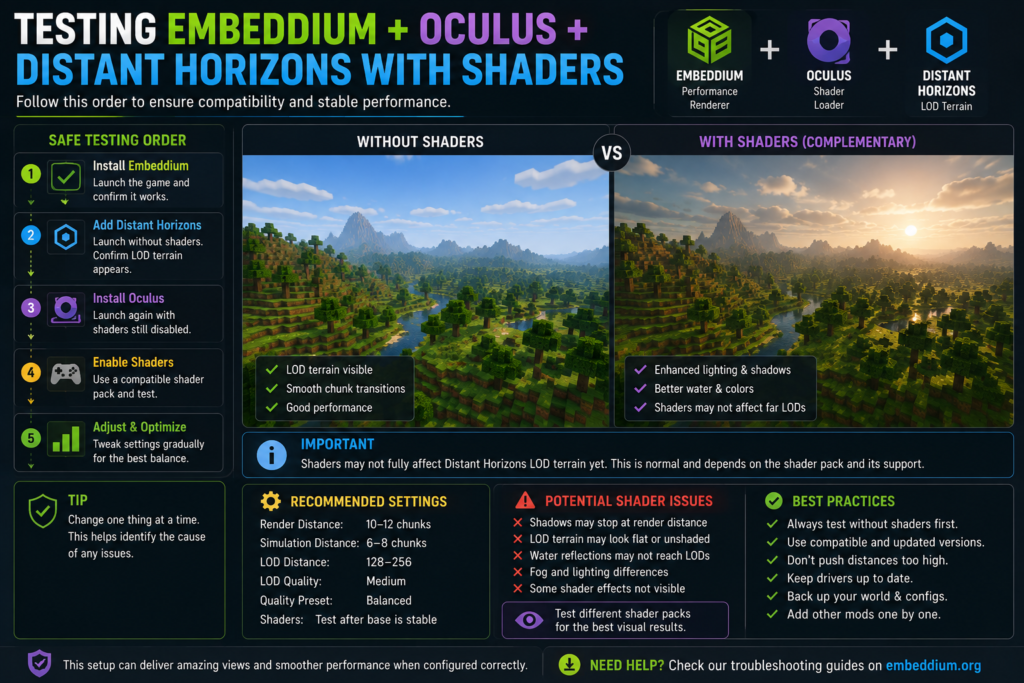
Embeddium, Distant Horizons, Oculus, and Shaders
Shaders add another rendering layer and therefore make compatibility more sensitive.
On Minecraft 1.20.1 Forge, Oculus is commonly used with Embeddium. Oculus 1.8.0 officially lists Embeddium as required content and includes a Distant Horizons 2.2+ compatibility fix.
However, this does not mean every shader pack supports Distant Horizons LOD rendering correctly.
Potential shader-related issues include:
- Distant terrain not receiving shader effects
- LODs appearing brighter or darker
- Water reflections stopping at the normal render-distance boundary
- Fog differences between normal chunks and LODs
- Incorrect shadows on distant terrain
- Near-plane clipping
- Invisible or flashing LOD sections
- Crashes during shader compilation
Distant Horizons 3.2.0-b adds LOD textures for its base renderer, but its release notes state that Iris-rendered shader LODs remain untextured unless support is implemented on the shader-loader side.
Safe Shader Testing Order
- Test Embeddium alone.
- Add Distant Horizons without shaders.
- Confirm LOD terrain appears.
- Add Oculus on Forge 1.20.1.
- Launch with shaders still disabled.
- Enable one compatible shader pack.
- Test a new world.
- Increase shader quality gradually.
If the game crashes after Oculus or shaders are enabled, follow the Embeddium and Oculus Crash on Minecraft 1.20.1 guide.
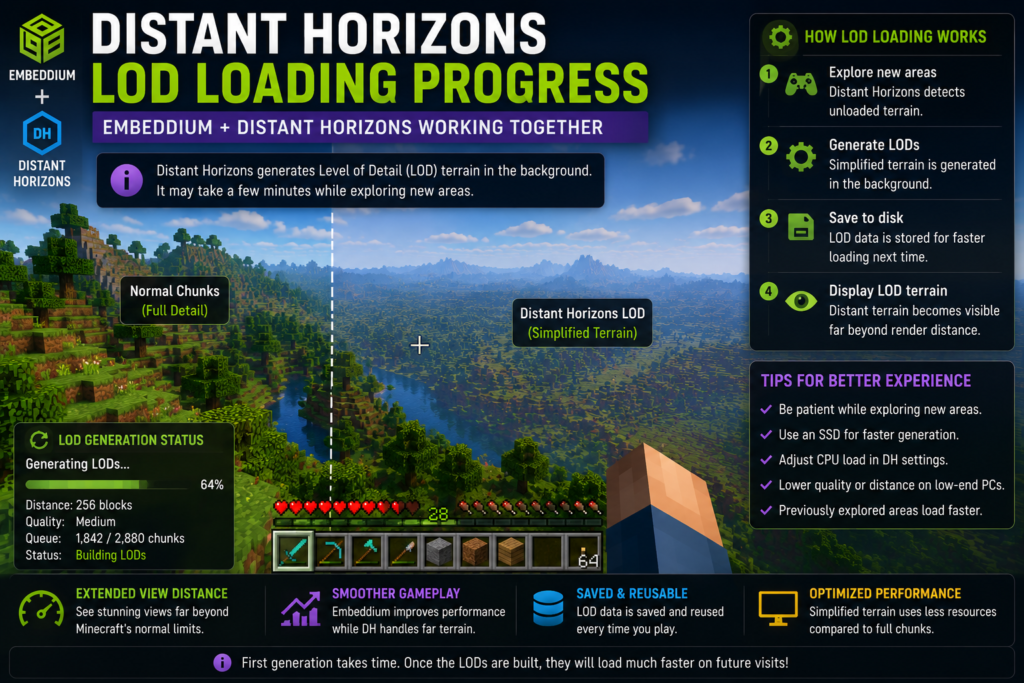
How Long Does Distant Horizons Take to Generate LODs?
Distant Horizons may not display complete distant terrain immediately.
LOD generation time depends on:
- Whether the chunks were previously explored
- CPU speed
- Generation-thread settings
- Storage performance
- World-generation mods
- Server limitations
- LOD distance
- LOD quality
- Other background applications
Previously explored terrain may appear faster because Minecraft or Distant Horizons already has data available. Unexplored terrain may require additional generation work.
Do not assume the mod is broken just because distant terrain is incomplete during the first few minutes.
Signs That LOD Generation Is Working
- Distant terrain gradually appears
- Gaps close while you remain in the area
- CPU activity increases temporarily
- Distant Horizons status information updates
- Returning to an explored area loads LODs faster
- LOD database files grow over time
Common Compatibility Problems and Fixes
Distant Horizons Does Not Appear
First check whether Distant Horizons is enabled in its settings.
Then verify:
- Correct Distant Horizons file
- Correct loader
- Correct Minecraft version
- LOD rendering enabled
- Sufficient time allowed for generation
- No duplicate Distant Horizons file
- No unsupported renderer installed
Temporarily test a new world with only Embeddium and Distant Horizons.
LODs Appear, but Normal Chunks Do Not Load Correctly
This may be caused by:
- Excessive normal render distance
- Excessive CPU load
- A conflicting chunk-generation mod
- A renderer conflict
- Corrupted Embeddium settings
- Incorrect graphics drivers
Lower normal render distance to 8–12 chunks and return Embeddium settings to their defaults.
Transparent Chunks or Invisible Blocks
Transparent terrain can be caused by a renderer conflict, shader issue, configuration problem, graphics-driver problem, or incompatible mod combination.
Try this order:
- Disable shaders.
- Remove Oculus temporarily.
- Remove Rubidium and OptiFine.
- Reset Embeddium settings.
- Reset Distant Horizons graphics settings.
- Test with only Embeddium and Distant Horizons.
- Update GPU drivers.
- Reinstall matching files.
Use the complete Embeddium Invisible Blocks and Transparent Chunks Fix if the nearby world also becomes transparent.
Individual issue reports have documented rendering and startup problems in some Embeddium, Oculus, Distant Horizons, GPU, or loader combinations. These reports show that configuration-specific failures can occur, but they do not establish universal incompatibility between the projects.
Minecraft Crashes During Startup
A startup crash commonly points to:
- Wrong mod loader
- Wrong Minecraft version
- Duplicate files
- Unsupported Java version
- Shader-loader conflict
- Outdated dependency
- Unsupported graphics environment
- Another mod modifying the same renderer
Remove optional mods and launch with only:
- Loader
- Embeddium
- Distant Horizons
If that profile still crashes, check the latest.log and crash report. Follow the Embeddium Crash on Startup guide for a complete diagnostic process.
Minecraft Freezes While Joining a World
World-entry freezing may happen while Distant Horizons:
- Opens an existing LOD database
- Migrates older data
- Generates missing LODs
- Processes a large modded world
- Encounters corrupted LOD data
- Competes with another world-generation mod
Allow a reasonable amount of time during the first test. If the process remains stuck:
- Close Minecraft safely.
- Back up the world.
- Test a new world.
- Disable Distant Horizons and confirm the world loads.
- Re-enable it with default settings.
- Review the log for repeated errors.
Do not delete a world save while troubleshooting an LOD database.
Distant Terrain Has Holes or Visible Seams
Visible seams can appear between:
- Normal chunks and LOD terrain
- Different LOD detail levels
- Newly generated and stored terrain
- Shader and non-shader rendering
- Areas generated by different world-generation versions
Distant Horizons updates have included fixes for LOD border holes and near-plane rendering, but a particular modpack can still expose visual problems.
Try:
- Updating Distant Horizons
- Resetting graphics options
- Disabling shaders
- Waiting for LOD regeneration
- Testing a clean profile
- Lowering LOD quality temporarily
FPS Drops After Installing Distant Horizons
Distant Horizons is designed to display long-distance terrain efficiently, but generating and loading that terrain still uses resources.
Reduce:
- LOD distance
- LOD quality
- CPU generation load
- Minecraft render distance
- Simulation distance
- Shader quality
- Shadow distance
- Resource-pack resolution
Avoid changing all settings simultaneously. Test one adjustment at a time.
High CPU Usage
High CPU usage is common while unexplored terrain is being processed.
To reduce it:
- Lower Distant Horizons CPU load
- Reduce generation threads
- Pause background applications
- Explore more slowly
- Avoid extreme LOD distances
- Use an SSD
- Allow already generated LODs to finish processing
CPU usage should normally become less intense once nearby LOD data has been generated and stored.
High RAM Usage or Stuttering
Try:
- Reducing LOD distance
- Reducing LOD quality
- Closing unnecessary programs
- Lowering normal render distance
- Removing high-resolution resource packs
- Avoiding excessive Java RAM allocation
- Testing without shaders
Distant Horizons 3.2.0-b Includes buffer pooling and memory-leak-related improvements, so older builds should be updated when a matching current file exists.
Multiplayer LODs Do Not Load
In multiplayer, Distant Horizons can only work with terrain data available to the client unless the server provides additional compatible support.
Possible reasons include:
- The client has not visited the area
- Server view distance is limited
- LOD data has not been generated locally
- Server-side support differs from the client setup
- The multiplayer database folder changed after an update
- The server uses incompatible world-generation behavior
Test the same mod combination in single-player. If it works locally but not on the server, the problem may involve server data availability or server configuration rather than Embeddium.
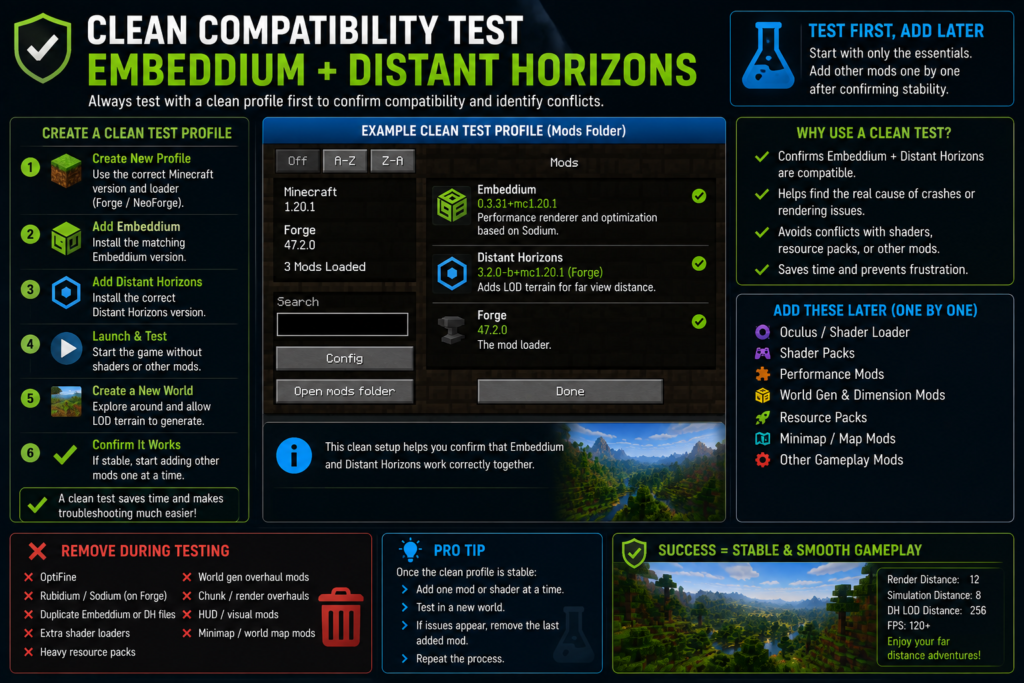
Clean Compatibility Test
A clean test is the fastest way to determine whether Embeddium and Distant Horizons are the real cause.
Create a separate profile containing only:
- Minecraft
- Correct Forge or NeoForge build
- Embeddium
- Distant Horizons
Do not initially include:
- Oculus
- Shaders
- OptiFine
- Rubidium
- World-generation mods
- Resource packs
- Entity-rendering addons
- Minimap or world-map addons
Create a new world and wait for LOD terrain to appear.
If the clean profile works, add other mods back individually or in small groups.
Should Embeddium and Distant Horizons Be Installed Client-Side or Server-Side?
Embeddium is a client-side rendering mod.
Distant Horizons supports client-side, server-side, and combined environments depending on its version and configuration. Its official project page lists all three supported environment types.
For ordinary single-player use, both can run through the client installation.
For multiplayer:
- Embeddium remains client-side
- Distant Horizons may run client-side
- Optional server support can improve the availability of distant terrain data
- Server owners should use a server-compatible Distant Horizons build
- Clients and servers should use compatible releases where server functionality is enabled
Do not install Embeddium as a required dedicated-server rendering mod.
Can Embeddium, Distant Horizons, and OptiFine Be Used Together?
This combination is not recommended.
OptiFine changes many rendering systems that overlap with Embeddium, shader loaders, and other optimization mods. Keeping OptiFine in the same profile can make it difficult to identify the cause of crashes or visual problems.
For Forge 1.20.1:
- Use Embeddium for rendering optimization
- Use Oculus only when shaders are needed
- Use Distant Horizons for LOD terrain
- Remove OptiFine during testing
Read the Embeddium vs OptiFine comparison before switching an existing OptiFine profile.
Can Sodium Be Used With Embeddium and Distant Horizons?
Do not install Sodium and Embeddium together in the same profile. They perform closely related rendering roles.
Choose the renderer based on your loader:
- Forge 1.20.1: Embeddium
- NeoForge: Embeddium or another version-appropriate renderer
- Fabric: Sodium or a compatible Embeddium build where officially available
The Embeddium vs Sodium comparison explains the loader and version differences in more detail.
Recommended Installation Order
Use this order for the safest setup:
- Install Minecraft and the loader.
- Launch the clean loader profile once.
- Install Embeddium.
- Confirm Minecraft launches.
- Install Distant Horizons.
- Test without shaders.
- Configure moderate LOD settings.
- Install Oculus only when required.
- Test one shader pack.
- Add the rest of the modpack gradually.
This process makes troubleshooting much easier than adding every mod at once.
Frequently Asked Questions
Does Embeddium work with Distant Horizons?
Yes. They can work together when both files match the same Minecraft version and loader. Compatibility can still be affected by shaders, GPU drivers, and other mods.
Which Embeddium version works with Distant Horizons on Forge 1.20.1?
Embeddium 0.3.31 is an official Minecraft 1.20.1 Forge and NeoForge release. Pair it with a Distant Horizons build specifically marked for Minecraft 1.20.1 Forge.
Which Distant Horizons version should I use on Minecraft 1.20.1?
As verified on August 2, 2026, Distant Horizons 3.2.0-b has an official Minecraft 1.20.1 Forge and Fabric build. Always check the project page again before downloading because releases can change.
Does Distant Horizons work with Embeddium on NeoForge 1.21.1?
Yes. Embeddium 1.0.15 and Distant Horizons 3.2.0-b both have official Minecraft 1.21.1 NeoForge builds.
Do I need Oculus?
No. Oculus is only needed when using shaders on supported Forge or NeoForge versions. Test Embeddium and Distant Horizons without Oculus first.
Can I use shaders with Embeddium and Distant Horizons?
Yes, but only compatible shader loaders and shader packs should be used. Some effects may stop at the normal render-distance boundary or display differently on LOD terrain.
Why are Distant Horizons LODs untextured with shaders?
Distant Horizons 3.2.0-b supports LOD textures in its base renderer, while its release notes state that Iris shader rendering may still display those LODs without textures.
Why are distant chunks not appearing?
LOD generation may still be running, the wrong file may be installed, rendering may be disabled, or another mod may be conflicting. Test a clean profile and wait for generation.
Why does Minecraft crash when enabling shaders?
The Oculus version, shader pack, Distant Horizons version, or GPU driver may be incompatible. Disable shaders and test each layer separately.
How much RAM should I allocate?
Start with approximately 4–6 GB for a light profile and 6–8 GB for a larger modpack when necessary. Avoid allocating most of the computer’s total memory to Minecraft.
Does Distant Horizons generate real chunks?
It creates simplified LOD representations for distant terrain. These are different from fully loaded nearby Minecraft chunks.
Can Distant Horizons damage my world?
Its LOD data is separate from ordinary world rendering, but backups should always be created before installing or updating major mods. Do not delete world files while attempting to reset LOD data.
Should I install both mods on a server?
Embeddium is client-side. Distant Horizons can support client, server, or combined operation depending on the setup and release.
Can I use Rubidium with Embeddium?
No. Keep only one primary renderer. Running Rubidium and Embeddium together can cause duplicate renderer conflicts.
What should I do if blocks become invisible?
Disable shaders, remove conflicting renderers, reset configs, verify versions, and follow the invisible blocks and transparent chunks troubleshooting guide.
Conclusion
Embeddium and Distant Horizons Compatibility Guide confirms that both mods can work together when the Minecraft version, loader, Java version, and mod files match. Forge 1.20.1 users can build around Embeddium0.3.31, while NeoForge 1.21.1 users can use Embeddium 1.0.15. Distant Horizons provides matching 3.2.0-b builds for both of these Minecraft versions as of August 2, 2026.
Install and test the base combination before adding Oculus, shaders, resource packs, or other rendering mods. Begin with moderate normal render distance and conservative LOD settings, then increase quality one option at a time. If crashes, missing LODs, transparent chunks, or visual seams appear, return to a clean profile and identify conflicts gradually.