Embeddium crash on startup normally happens because Minecraft, the installed mod loader, Java, Embeddium, or another rendering-related mod does not match the rest of the installation. A crash can also begin after updating one part of a previously working modpack without updating the other connected components.
The safest troubleshooting method is to test Embeddium inside a clean profile, verify every version, and then add the remaining mods back gradually. Embeddium is a client performance mod available for supported Forge, Fabric, and NeoForge combinations, but its project prioritizes compatibility rather than guaranteeing that every rendering addon will work with every release.
Quick Embeddium Startup Crash Fix
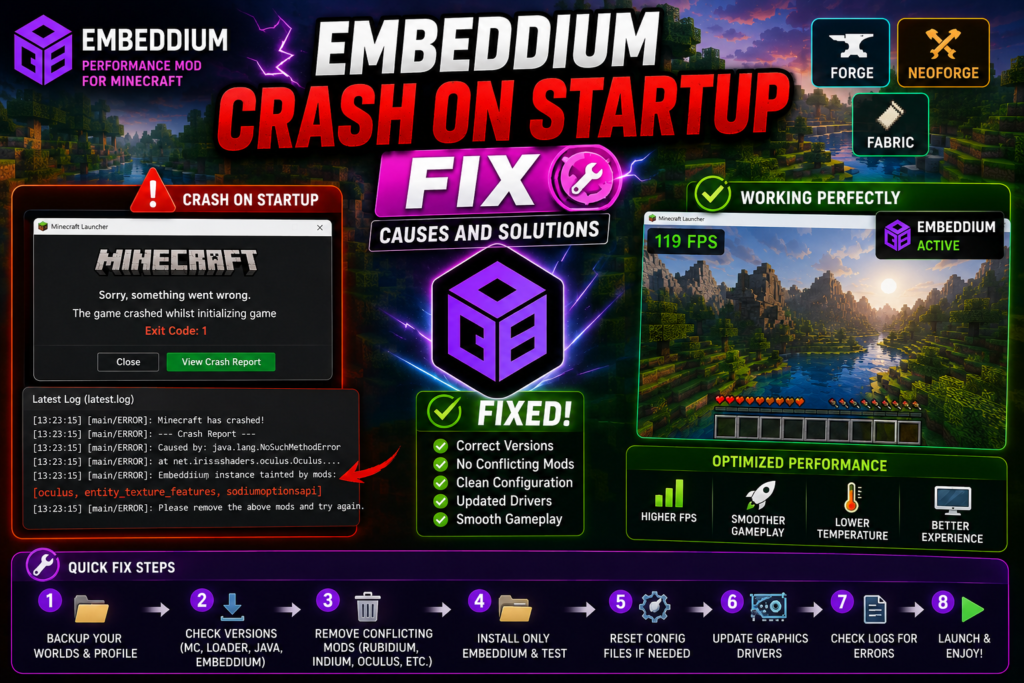
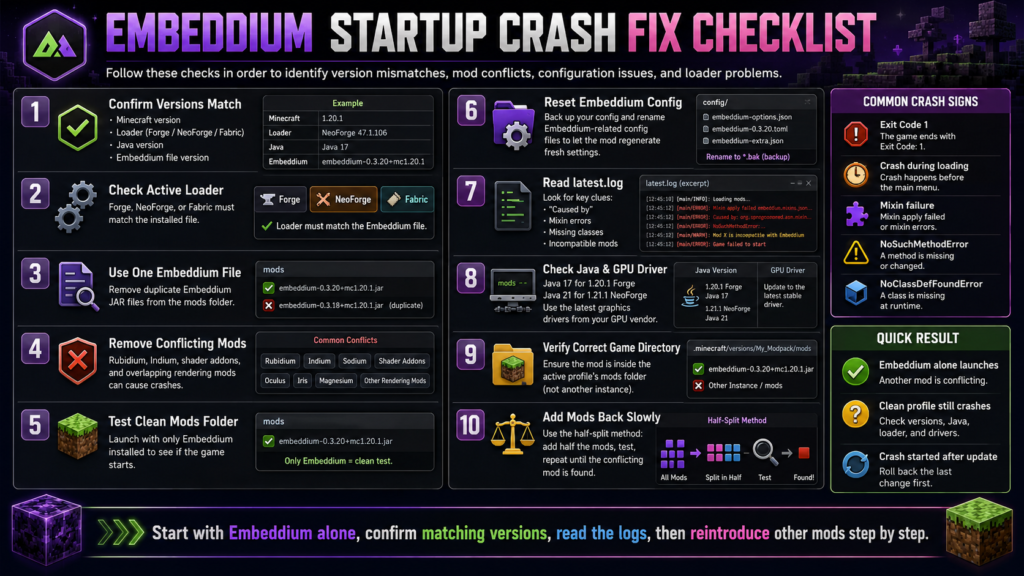
Try these steps in order:
- Close Minecraft and the launcher.
- Back up your worlds and current profile.
- Confirm the exact Minecraft version.
- Confirm whether the profile uses Forge, NeoForge, or Fabric.
- Download an Embeddium file matching both the game version and loader.
- Keep only one Embeddium JAR in the mods folder.
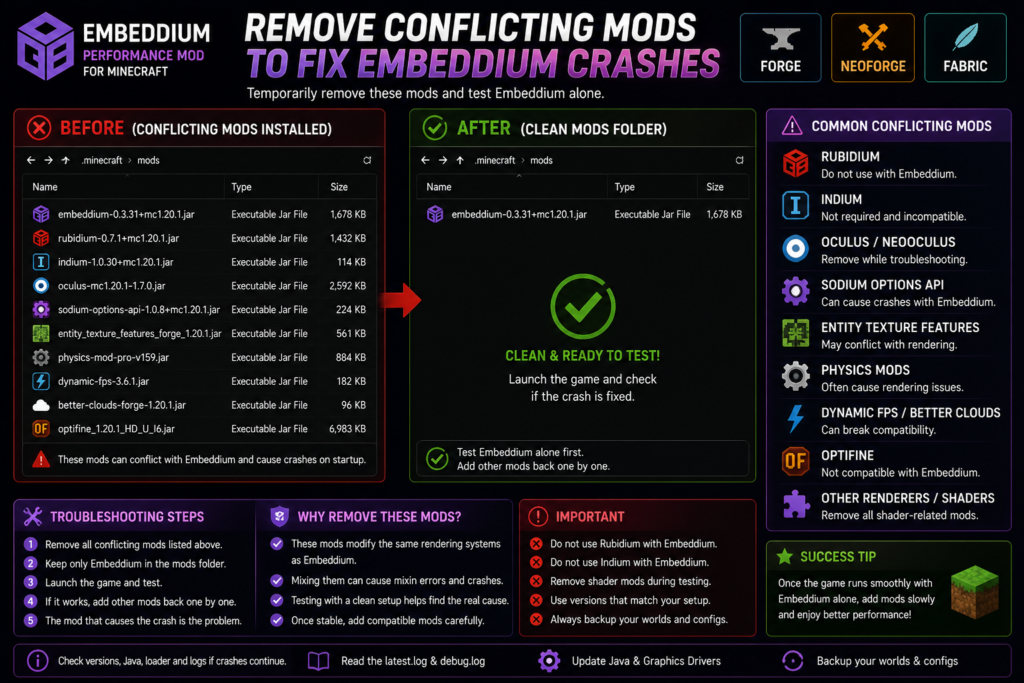
- Remove Rubidium, Indium, OptiFine, and other overlapping rendering mods.
- Temporarily remove shader and graphics addons.
- Verify the correct Java version.
- Launch a clean profile containing only Embeddium.
- Reset Embeddium configuration files when necessary.
- Check
latest.log,debug.log, and the newest crash report.
Do not update every mod simultaneously while troubleshooting. Change one group at a time so the actual cause remains identifiable.
What Does an Embeddium Startup Crash Look Like?
A startup crash may happen at different stages:
| Crash stage | Common indication |
|---|---|
| Before loading window appears | Java, launcher, or loader problem |
| During Forge or NeoForge loading screen | Wrong mod version or dependency |
| Near the end of loading | Rendering addon or mixin conflict |
| Immediately after the main window opens | Graphics driver or OpenGL problem |
| After selecting a world | World-specific mod, entity, or rendering conflict |
| Launcher returns with Exit Code 1 | Read the log for the real cause |
| No crash report is created | Check latest.log or debug.log |
Exit Code 1 is only a general indication that Minecraft stopped. The useful information is normally located near the end of the latest log or crash report.
Common Causes of Embeddium Crashes
1. Minecraft and Embeddium Versions Do Not Match
Every Embeddium file is built for particular Minecraft and loader versions.
For example, these combinations are not interchangeable:
Minecraft 1.20.1 Forge
Minecraft 1.20.1 NeoForge
Minecraft 1.21.1 NeoForge
Minecraft 1.21.4 NeoForge
A file built for Minecraft 1.21.1 should not be placed inside a Minecraft 1.20.1 profile. Similarly, a Forge file should not be assumed to work in Fabric or a different NeoForge release.
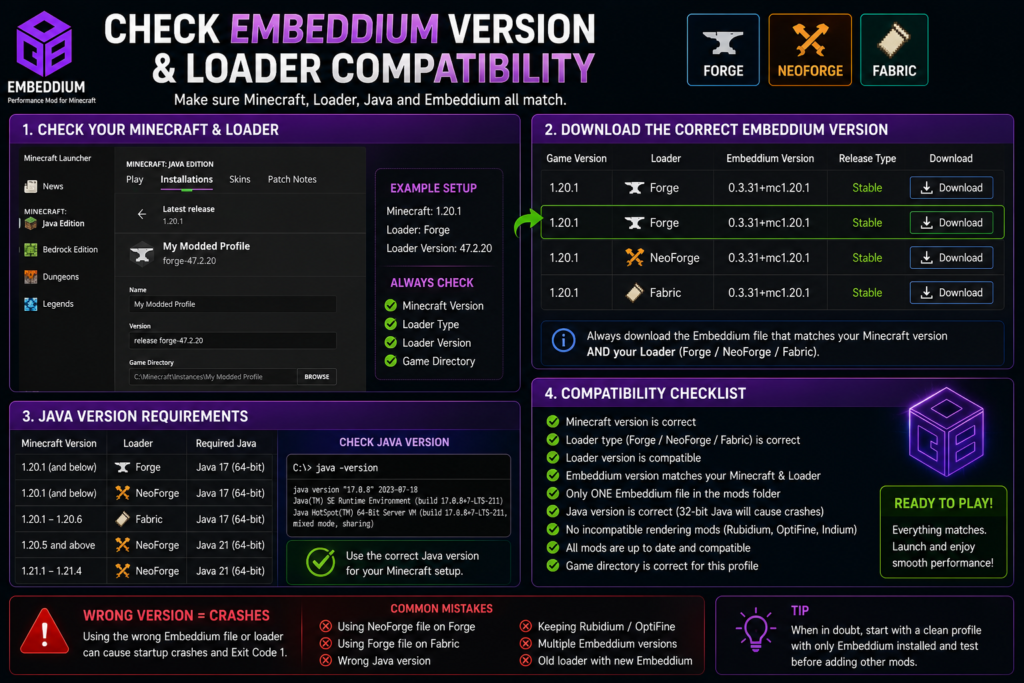
The Embeddium project currently describes its broad platform coverage as Forge for Minecraft 1.20.1 and older, Fabric for 1.20.1 through 1.20.6, and NeoForge for 1.20.1 and newer. Always verify the individual version page because availability can differ between specific releases.
Fix
Check all four values:
| Component | Must match |
|---|---|
| Minecraft | Exact game release |
| Loader | Forge, NeoForge, or Fabric |
| Embeddium | Matching Minecraft and loader |
| Addons | Matching Embeddium and Minecraft |
Do not select a file only because it has the highest Embeddium version number.
2. Wrong Java Version
An incorrect Java version can prevent the loader from starting or cause a crash before Embeddium is fully loaded.
Use these common combinations:
| Minecraft setup | Java version |
|---|---|
| Minecraft 1.20.1 Forge | Java 17 |
| Minecraft 1.20.1 NeoForge | Java 17 |
| Minecraft 1.21.1 NeoForge | Java 21 |
| Minecraft 1.21.4 NeoForge | Java 21 |
Forge’s Minecraft 1.20.1 documentation specifies a 64-bit Java 17 environment. NeoForge’s current user guide states that Minecraft 1.20.5 and newer uses Java 21.
Check the active Java version
Open Command Prompt and run:
java -versionA Forge 1.20.1 profile should normally show a version beginning with:
17A NeoForge 1.21.1 profile should normally use:
21When several Java versions are installed, make sure the Minecraft launcher profile is using the intended Java executable.
3. Duplicate Embeddium Files
Keeping multiple releases in the same mods folder can produce duplicate-mod errors or unpredictable startup failures.
Incorrect example:
mods/
├── embeddium-0.3.24+mc1.20.1.jar
└── embeddium-0.3.31+mc1.20.1.jar
Correct example:
mods/
└── embeddium-0.3.31+mc1.20.1.jar
Fix
- Close Minecraft.
- Open the active profile’s mods folder.
- Search for
embeddium. - Remove every older or duplicate file.
- Keep only the correct matching release.
- Launch the profile again.
Also check subfolders because some launchers allow mods to be organized inside nested directories.
4. Rubidium or Indium Is Installed
Embeddium and Rubidium should not be installed together because both modify overlapping Minecraft rendering systems. Official Embeddium version listings identify Rubidium as a known incompatibility.
Embeddium’s project documentation also states that Fabric Rendering API support is integrated and that Indium is not required and will not work with Embeddium.
Remove these combinations
Embeddium + Rubidium
Embeddium + Indium
Multiple Embeddium versions
Do not replace Embeddium with another renderer until you have first confirmed that Embeddium alone starts correctly.
5. Shader or Rendering Addon Conflict
Shader support usually requires additional mods such as Oculus, NeOculus, Iris-based integrations, dynamic-lighting addons, rendering APIs, or alternate settings interfaces.
These addons are highly version-sensitive. A combination that worked before an update may stop working after only one component changes.
The Embeddium issue tracker contains startup-crash reports involving Oculus and related rendering integrations. One report showed a NoSuchFieldError inside an Oculus shader-loading stack, which is a strong indication of mismatched mod APIs rather than proof that Embeddium alone caused the entire failure.
Fix
Temporarily remove:
- Oculus or NeOculus
- Shader packs
- Dynamic-lighting mods
- Sodium or Embeddium Options API addons
- Entity rendering extensions
- Physics and visual-effect mods
- Alternate video-settings menus
Launch Minecraft with only Embeddium installed. When the clean profile works, reinstall compatible addons one at a time.
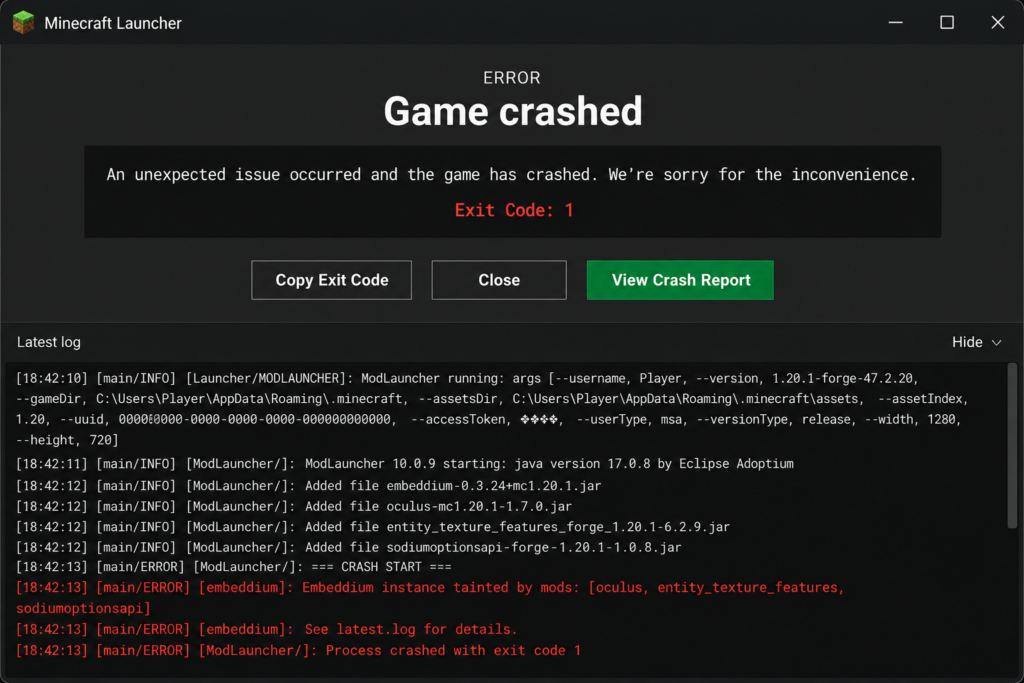
6. “Embeddium Instance Tainted by Mods”
A crash report may contain a line similar to:
Embeddium instance tainted by mods:
[oculus, entity_texture_features, sodiumoptionsapi]
This does not mean the computer contains malware. It means other installed mods are modifying or integrating with areas of the rendering system used by Embeddium.
Issue reports show that the message can list mods such as Oculus, Entity Texture Features, Sodium/Embeddium Options API, Physics Mod, or other renderer integrations. The listed mod is not automatically proven to be the sole cause, but it should be removed before testing or requesting Embeddium support.
Fix
- Copy the listed mod names from the crash report.
- Remove those mods temporarily.
- Launch Embeddium without them.
- Reinstall one mod at a time.
- Use versions specifically compatible with your setup.
Do not simply hide the incompatible-mod warning. Disabling a warning does not make conflicting code compatible.
7. Forge, NeoForge, or Fabric Is Outdated
Embeddium may require a particular minimum loader version. Likewise, a newly updated loader may temporarily expose compatibility problems in older mods.
An Embeddium issue documented that a NeoForge beta change to reload-listener ordering could make mods using older injection methods crash during startup. This demonstrates why beta loader updates should be tested in a separate profile before being applied to a working modpack.
Fix
- Read the Embeddium version requirements.
- Use a loader release intended for the same Minecraft version.
- Avoid unnecessary beta loader builds.
- Update the loader only when required.
- Roll back the loader when the crash started immediately after its update.
Do not downgrade a world without keeping a backup.
8. Beta or Experimental Embeddium Release
Beta builds may support newer Minecraft versions before every compatibility issue is resolved.
A public Embeddium issue reported a Minecraft 1.21.4 NeoForge beta crashing on startup even in a profile where Embeddium was the only added mod. That report does not mean every 1.21.4 installation will crash, but it shows why beta files should be tested separately.
Fix
When using a beta:
- Check whether a newer beta or stable release exists.
- Test the release in a new profile.
- Use the loader version listed on its version page.
- Avoid mixing beta and stable rendering addons.
- Roll back to the last working setup when necessary.
9. Corrupted Embeddium Configuration
A configuration file created by an older version can sometimes cause problems after an update.
Safest reset method
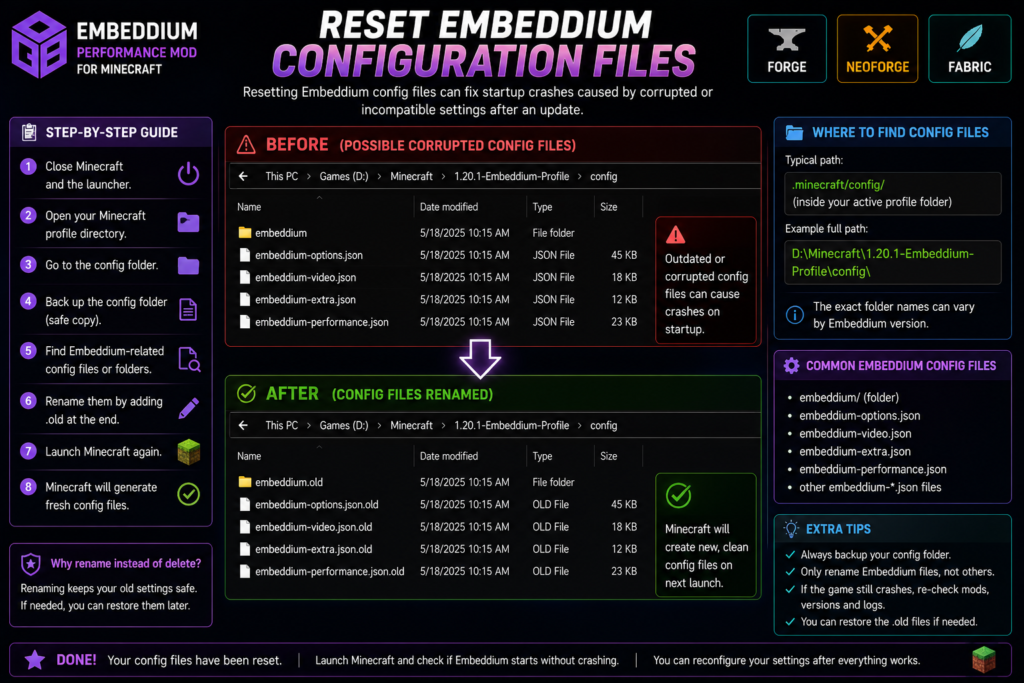
- Close Minecraft.
- Open the active profile directory.
- Back up the
configfolder. - Find files or folders clearly associated with Embeddium.
- Rename them by adding
.old. - Launch Minecraft again.
Example:
embeddium-config-filebecomes:
embeddium-config-file.oldRenaming is safer than immediately deleting because the original settings can be restored.
Configuration names can vary between Embeddium versions, so do not remove unrelated files.
10. Outdated Graphics Driver
Embeddium interacts closely with the graphics pipeline. An outdated, corrupted, or incorrectly selected driver can cause startup or early-display failures.
NeoForge’s troubleshooting documentation says early-loading display errors commonly point toward graphics settings, while visual problems are often associated with outdated drivers.
Fix
Update through the official utility for your hardware:
- Intel
- AMD
- NVIDIA
After updating:
- Restart the computer.
- Confirm Minecraft uses the intended GPU.
- Disable third-party overlays temporarily.
- Test without shaders.
- Launch the clean Embeddium profile.
Avoid random driver-download websites.
11. Minecraft Is Using the Wrong GPU
Laptops may contain both integrated and dedicated graphics. Minecraft can launch using the weaker or unsupported adapter.
Windows check
Open:
Settings
→ System
→ Display
→ Graphics
Add or locate the Java executable used by Minecraft and select:
High PerformanceRestart Minecraft and inspect the F3 screen or log to verify which GPU is active.
12. Incorrect Mods Folder
The Embeddium file may be placed in the default .minecraft/mods directory while the selected launcher profile uses a separate game directory.
Check the active directory
In the Minecraft Launcher:
- Open Installations.
- Edit the Forge or NeoForge profile.
- Check Game Directory.
- Open that exact directory.
- Place Embeddium in its
modsfolder.
NeoForge recommends separate profiles and game directories for modded installations to isolate mods from the vanilla game.
Complete Step-by-Step Fix
Step 1: Back Up the Current Profile
Copy these folders to a safe location:
saves
config
mods
resourcepacks
shaderpacks
NeoForge also recommends backing up worlds before updating the loader or installed mods.
Step 2: Create a Clean Test Profile
Create a new launcher installation using the same Minecraft and loader versions.
Use a separate game directory such as:
D:\Minecraft\Embeddium-Crash-TestLaunch the empty Forge or NeoForge profile once before installing Embeddium.
Step 3: Install Only Embeddium
The clean mods folder should contain only:
mods/
└── correct-embeddium-version.jar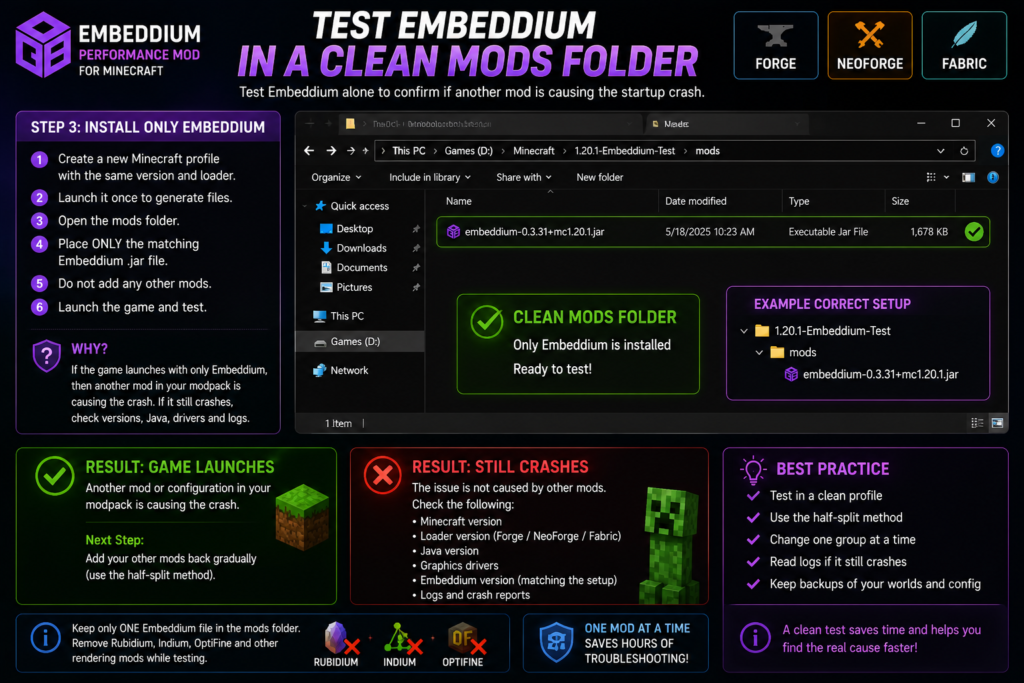
Do not initially include:
- Shader addons
- OptiFine
- Rubidium
- Indium
- Physics mods
- Dynamic lights
- Entity texture extensions
- Alternative settings menus
Result
Clean profile launches:
Another mod or configuration in the original profile is causing the conflict.
Clean profile crashes:
Check the Embeddium file, Minecraft version, loader, Java, graphics driver, and log.
Step 4: Use the Half-Split Method
When the clean profile works:
- Divide the remaining mods into two equal groups.
- Add the first half.
- Launch Minecraft.
- When it crashes, the problem is probably in the added half.
- Divide that group again.
- Repeat until the conflicting mod is found.
This is much faster than testing 100 mods one by one.
Step 5: Check Recent Updates
Create a list of everything changed before the crash started:
- Embeddium
- Forge or NeoForge
- Minecraft
- Java
- Oculus or NeOculus
- Graphics driver
- Shader pack
- Resource pack
- Another mod
- Configuration files
Roll back the most recent change first.
Do not randomly downgrade several components simultaneously.
Step 6: Reset Embeddium Configuration
Rename the Embeddium-related configuration files and launch the game again.
When the reset fixes the crash, reapply settings gradually instead of restoring the complete old configuration.
Step 7: Update the Graphics Driver
Install the latest stable driver for the active GPU and restart the computer.
Test the profile without:
- Shaders
- Recording software
- GPU overlays
- Custom OpenGL tools
- Third-party injectors
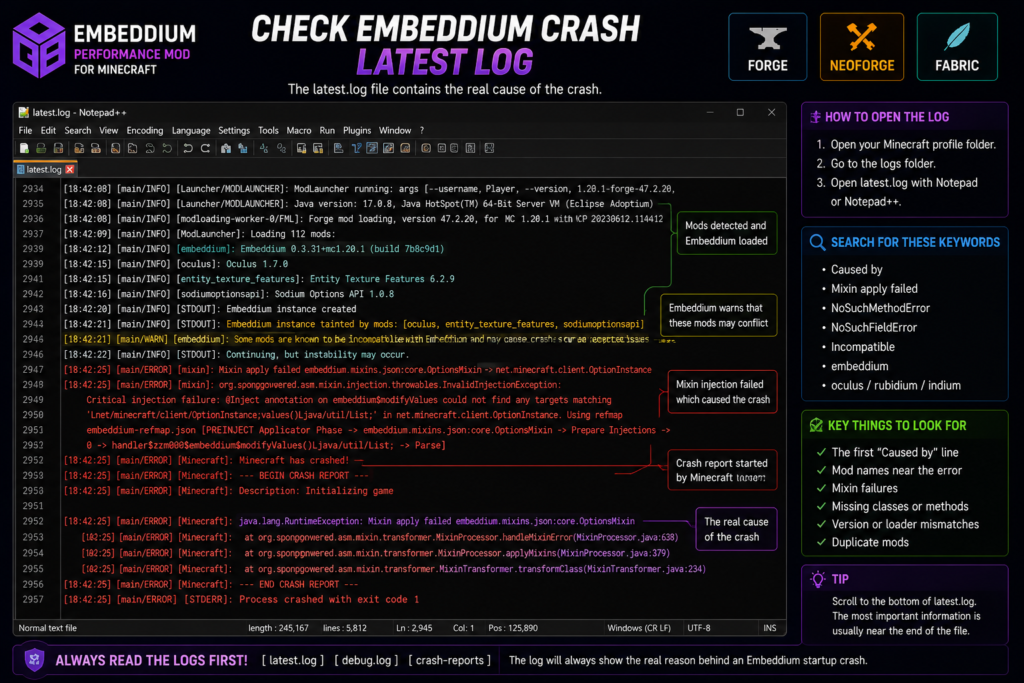
Step 8: Read the Crash Log
Open the active profile directory and check:
logs/latest.log
logs/debug.log
crash-reports/
NeoForge specifically recommends providing debug.log from the instance’s logs folder when requesting gameplay support.
Search near the bottom for terms such as:
Caused by:
Mixin apply failed
NoSuchMethodError
NoSuchFieldError
NoClassDefFoundError
requires
incompatible
duplicate
embeddium
oculus
rubidium
indium
The first meaningful Caused by: section is generally more useful than the launcher’s final Exit Code 1 message.
Common Error Messages
Exit Code 1
Exit Code 1 does not identify a specific Embeddium fault.
Check:
- Java version
- Loader version
- Duplicate files
- Missing dependencies
- Mod conflicts
latest.log- Crash reports
Mixin Apply Failed
A mixin failure commonly points to:
- Incompatible mod versions
- Two mods changing the same class
- Wrong Minecraft version
- Wrong loader file
- Outdated addon
- Loader update changing internal behavior
Remove the mod named near the failing mixin and test again.
NoSuchMethodError or NoSuchFieldError
These errors usually indicate that one mod expects code that is missing or different in another installed version.
For example:
NoSuchMethodError
NoSuchFieldError
Often appears after updating only one part of a connected rendering stack.
Match Embeddium, loader, shader addon, and related compatibility mods.
Mod Requires a Different Version
A loader may directly state that a mod requires:
Minecraft x.x.x
Forge x.x.x
NeoForge x.x.x
Java xx
Install the required version or select a compatible mod release. Do not edit a JAR filename to make it appear compatible.
Could Not Find or Load Main Class
On NeoForge, errors involving @user_jvm_args.txt can result from an outdated Java installation or an incorrectly configured Java path. NeoForge’s troubleshooting documentation recommends checking the installed version and PATH configuration.
Crash Without a Crash Report
When no file appears incrash-reports, inspect:
logs/latest.log
logs/debug.log
launcher_log.txt
A reported Embeddium and FTB Library conflict, for example, was described as producing a startup failure without a normal crash report, while information remained available through latest.log. Treat such issue reports as diagnostic examples rather than universal compatibility rules.
Forge 1.20.1 Crash Checklist
For Minecraft 1.20.1 Forge, verify:
| Component | Required check |
|---|---|
| Java | 64-bit Java 17 |
| Forge | 47.x compatible build |
| Embeddium | Minecraft 1.20.1 Forge release |
| Rubidium | Removed |
| Indium | Removed |
| Duplicate Embeddium | Removed |
| Shader addon | Tested separately |
| Mods folder | Correct Forge profile directory |
Forge 1.20.1 officially uses Java 17, and Embeddium’s project lists Forge availability for 1.20.1 and older versions.
NeoForge 1.21.1 Crash Checklist
For Minecraft 1.21.1 NeoForge, verify:
| Component | Required check |
|---|---|
| Java | 64-bit Java 21 |
| NeoForge | Matching 1.21.1 version |
| Embeddium | Minecraft 1.21.1 NeoForge release |
| Fabric file | Not installed |
| Forge-only file | Not installed |
| Shader addon | Matching release |
| Beta loader | Avoid unless required |
| Mods folder | Correct NeoForge profile directory |
NeoForge’s Java guidance places Minecraft 1.20.5 and newer on Java 21, while Embeddium lists NeoForge support from Minecraft 1.20.1 onward.
When to Report an Embeddium Bug
Submit a bug report only after confirming that the problem can be reproduced in a clean profile.
Include:
- Minecraft version
- Forge, Fabric, or NeoForge version
- Embeddium version
- Java version
- Operating system
- GPU and driver version
- Exact reproduction steps
latest.logdebug.log- Crash report
- Minimal list of required mods
Embeddium’s project asks users to report Embeddium problems through its own issue tracker rather than Sodium or CaffeineMC support channels.
Do not upload screenshots of logs when a complete text log is available.
Frequently Asked Questions
Why does Embeddium crash when Minecraft starts?
The most common causes are incorrect Minecraft or loader versions, the wrong Java release, duplicate JAR files, conflicting rendering mods, broken configuration files, shader-addon mismatches, or graphics-driver problems.
How do I fix Embeddium Exit Code 1?
Exit Code 1 is a general failure message. Open the latest log or crash report, check the first meaningful Caused by: section, and then verify Java, loader, Minecraft, Embeddium, and conflicting mods.
Can Rubidium and Embeddium be installed together?
No. Official Embeddium release pages list Rubidium as a known incompatibility. Remove Rubidium before testing Embeddium.
Does Embeddium require Indium?
No. Embeddium includes Fabric Rendering API support, and its project documentation says Indium is not required and will not work with Embeddium.
What does “Embeddium instance tainted by mods” mean?
It means other installed mods have modified or integrated with rendering systems used by Embeddium. Remove the listed mods for a clean test before assuming Embeddium itself is the only cause.
Can Oculus cause an Embeddium startup crash?
Certain Oculus, Embeddium, addon, and Minecraft version combinations have generated public crash reports. This does not make every Oculus version universally incompatible, but the shader stack should be removed first during troubleshooting.
Should I delete the Embeddium configuration?
Back it up and rename it first. Renaming allows Minecraft to generate a fresh configuration without permanently losing the previous settings.
Which Java version should I use?
Minecraft 1.20.1 Forge generally uses Java 17. Minecraft 1.21.1 NeoForge uses Java 21. Confirm the requirements for the exact Minecraft and loader combination.
Why does Embeddium work alone but crash in my modpack?
When Embeddium launches alone, another installed mod, addon, configuration, or version combination is causing the conflict. Use the half-split method to identify the smallest group that reproduces the crash.
Why did Embeddium crash after an update?
Only one part of the mod stack may have been updated. The new Embeddium, loader, shader addon, or rendering API may no longer match the remaining versions.
Can outdated GPU drivers crash Embeddium?
Graphics-driver problems can cause early-loading, display, OpenGL, or rendering failures. Update through the official GPU manufacturer and test again without shaders.
Does Embeddium need to be installed on a server?
Embeddium is identified as client-side. It is normally installed on the player’s local profile for rendering performance rather than being required on an ordinary server.
Conclusion
Embeddium Crash on Startup problems are usually resolved by matching Minecraft, Java, the mod loader, and Embeddium; removing duplicate or incompatible rendering mods; resetting configuration files; updating graphics drivers; and testing the mod inside a clean profile.
Start with Embeddium alone, then add other mods back gradually. Read the latest log instead of relying only on Exit Code 1, and avoid mixing Rubidium, Indium, incorrect loader files, or mismatched shader addons with Embeddium.