Understanding Embeddium-compatible Minecraft versions is important because every Embeddium file is built for specific combinations of Minecraft, Forge, Fabric, NeoForge, and Java. Installing a file for the wrong game version or loader commonly results in a startup crash, dependency warning, or Exit Code 1.
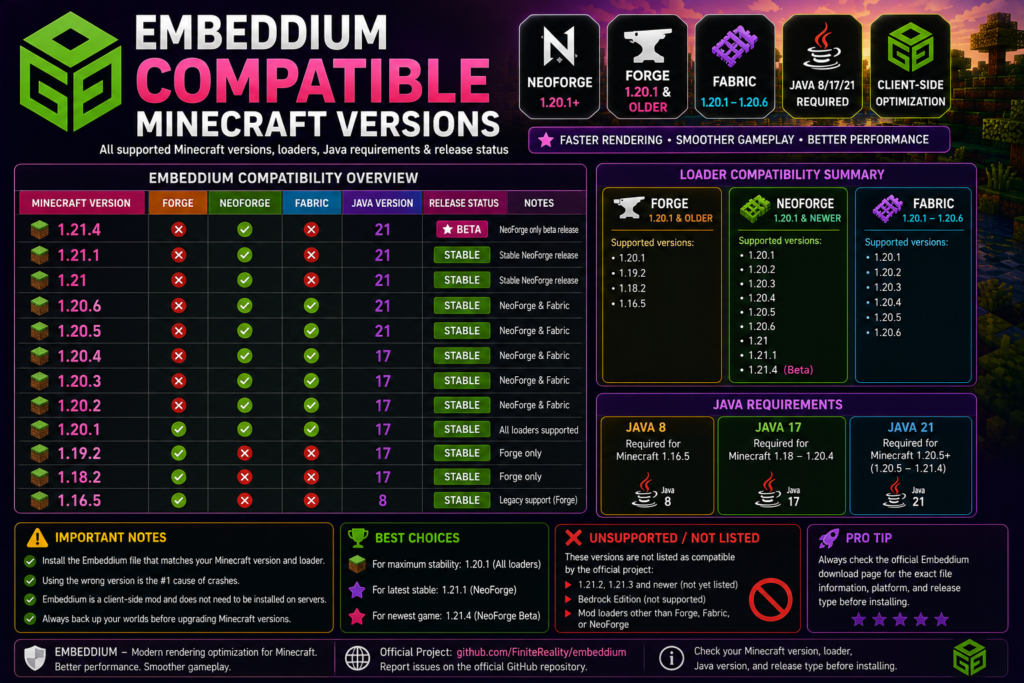
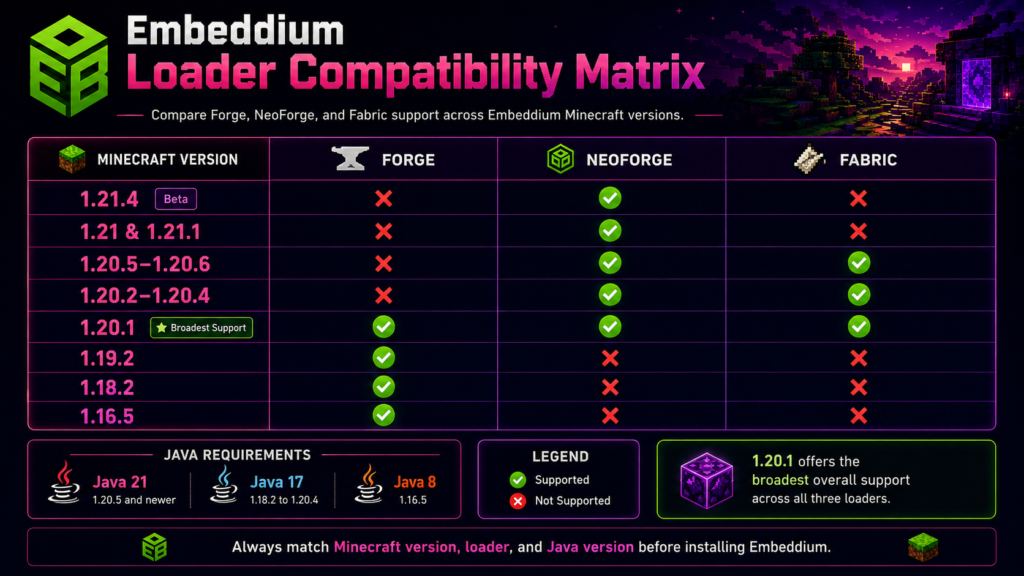
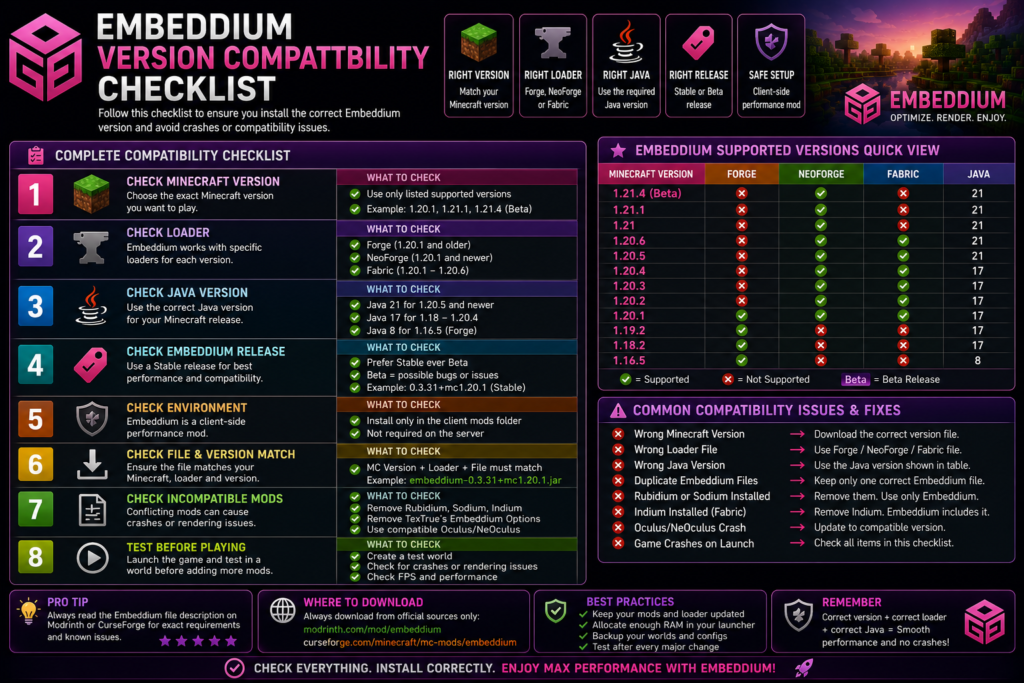
The official Embeddium project currently lists support for Minecraft Java Edition 1.21.4, 1.21–1.21.1, 1.20.1–1.20.6, 1.19.2, 1.18.2, and 1.16.5. Forge support applies to 1.20.1 and older, Fabric support covers 1.20.1 through 1.20.6, and NeoForge support begins with 1.20.1 and newer supported releases.
Quick Compatibility Answer
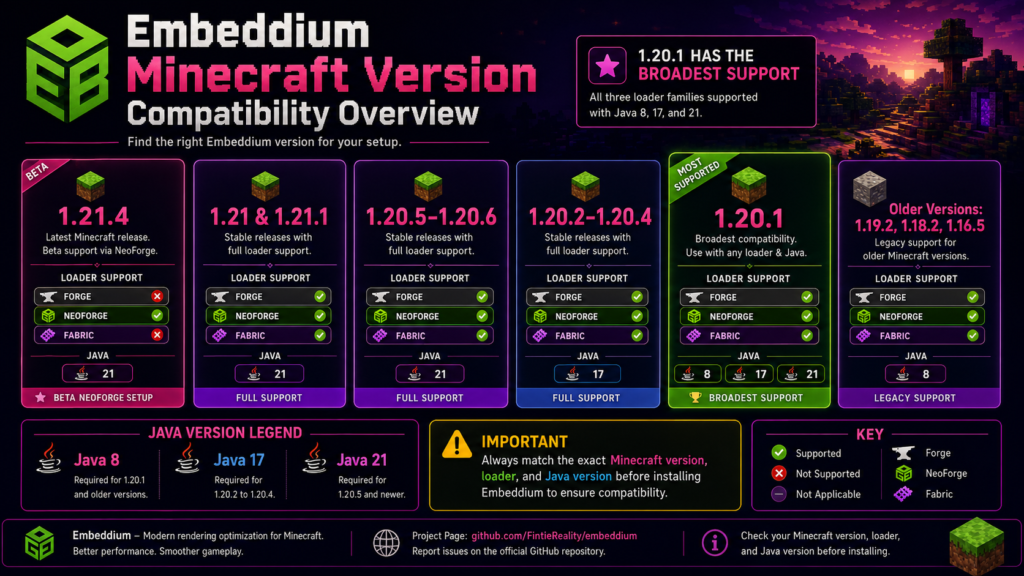
Embeddium currently supports these main Minecraft versions:
| Minecraft version | Supported loaders | Java | Release notes |
|---|---|---|---|
| 1.21.4 | NeoForge | Java 21 | Beta release |
| 1.21.1 | NeoForge | Java 21 | Stable release available |
| 1.21 | NeoForge | Java 21 | Stable releases available |
| 1.20.6 | NeoForge and Fabric | Java 21 | Supported |
| 1.20.5 | NeoForge and Fabric | Java 21 | Supported |
| 1.20.4 | NeoForge and Fabric | Java 17 | Supported |
| 1.20.3 | NeoForge and Fabric | Java 17 | Supported |
| 1.20.2 | NeoForge and Fabric | Java 17 | Supported |
| 1.20.1 | Forge, NeoForge, and Fabric | Java 17 | Broadest loader support |
| 1.19.2 | Forge | Java 17 | Supported older releases |
| 1.18.2 | Forge | Java 17 | Supported older releases |
| 1.16.5 | Forge | Java 8 | Legacy support |
This table combines the project’s official Minecraft and loader coverage with the Java requirements documented by Forge and NeoForge. NeoForge uses Java 17 for Minecraft 1.20.2–1.20.4 and Java 21 for Minecraft 1.20.5 and newer; Forge 1.20.1 uses a 64-bit Java 17 environment.
Complete Embeddium Version Range
The official project compatibility listing currently includes:
Minecraft 1.21.4
Minecraft 1.21
Minecraft 1.21.1
Minecraft 1.20.1
Minecraft 1.20.2
Minecraft 1.20.3
Minecraft 1.20.4
Minecraft 1.20.5
Minecraft 1.20.6
Minecraft 1.19.2
Minecraft 1.18.2
Minecraft 1.16.5
Versions such as Minecraft 1.21.2, 1.21.3, and releases newer than 1.21.4 are not shown in the current official Embeddium compatibility list. Do not install a nearby version’s JAR unless its individual file page explicitly lists your exact Minecraft release.
Embeddium Loader Compatibility
Forge Compatibility
Embeddium supports Minecraft Forge on:
Minecraft 1.20.1 and older supported versionsThis includes the officially listed branches for:
- Minecraft 1.20.1
- Minecraft 1.19.2
- Minecraft 1.18.2
- Minecraft 1.16.5
The project’s current description limits Forge coverage to Minecraft 1.20.1 and older. A Forge Embeddium file should not be installed in a Fabric or newer NeoForge profile.
NeoForge Compatibility
NeoForge support covers supported releases beginning with Minecraft 1.20.1, including:
1.20.1–1.20.6
1.21
1.21.1
1.21.4
Minecraft 1.21.4 uses the NeoForge-only Embeddium 1.0.12-beta.1+mc1.21.4 file. The release is explicitly marked as beta and client-side.
Fabric Compatibility
Fabric support is officially described as covering:
Minecraft 1.20.1 through 1.20.6Fabric builds are separate from Forge and NeoForge builds. For example, the official Minecraft 1.20.5 Fabric release page lists Fabric as its platform and identifies Sodium and Indium as incompatible with that Embeddium build.
Can One JAR Support Every Loader?
No. Some releases may list more than one compatible loader, but you must verify the platform shown on the individual download page.
A filename containing only the Minecraft version does not guarantee that it supports:
Forge
NeoForge
Fabric
Always check both the Minecraft version and platform before downloading.
Minecraft 1.21.4 Compatibility
Minecraft 1.21.4 is supported through:
Embeddium 1.0.12-beta.1+mc1.21.4
Loader: NeoForge
Java: 21
Environment: Client-side
Release type: Beta
The official release page warns that this build may contain issues and may not provide the same stability as previous releases. It also lists Rubidium and TexTrue’s Embeddium Options as known incompatibilities.
Important 1.21.4 limitations
Do not use the 1.21.4 build with:
- Forge
- Fabric
- Java 17
- Rubidium
- TexTrue’s Embeddium Options
- A Minecraft 1.21 or 1.21.1 profile
- Old Oculus or NeOculus files
Minecraft 1.21.4 is therefore compatible, but it is not the safest version for a large production modpack unless you have already tested the full setup.
Minecraft 1.21 and 1.21.1 Compatibility
Minecraft 1.21 and 1.21.1 use NeoForge Embeddium builds.
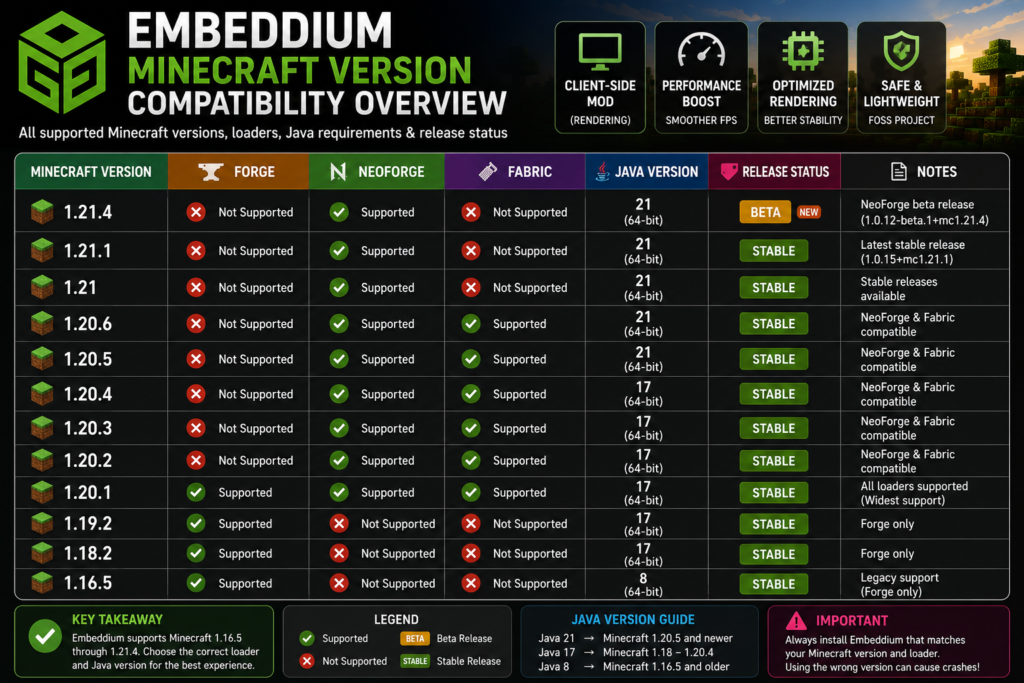
The official project listings include a stable 1.0.15 release for Minecraft 1.21.1, while the 1.21 branch has separate 1.0.x releases. Both require Java 21 because they are newer than Minecraft 1.20.5.
Best choice between 1.21.1 and 1.21.4
Minecraft 1.21.1 is generally the more conservative Embeddium choice because an official stable release is available.
Minecraft 1.21.4 should be selected when:
- Another mod specifically requires 1.21.4.
- You need content from Minecraft 1.21.4.
- All important mods have matching NeoForge 1.21.4 files.
- You accept the beta status of Embeddium’s 1.21.4 build.
Minecraft 1.20.5 and 1.20.6 Compatibility
Embeddium supports both Minecraft 1.20.5 and 1.20.6 through Fabric and NeoForge branches. Official files include 0.3.x builds for these versions.
These versions require:
Java 21
64-bit JVM
Minecraft changed to Java 21 beginning with version 1.20.5. Using Java 17 may prevent the loader or game from starting correctly.
Correct setup examples
Minecraft 1.20.6
NeoForge 1.20.6
Java 21
Embeddium NeoForge 1.20.6 file
or:
Minecraft 1.20.6
Fabric Loader
Java 21
Embeddium Fabric 1.20.6 file
Do not mix the Fabric and NeoForge files.
Minecraft 1.20.2, 1.20.3, and 1.20.4
These versions fall inside Embeddium’s Fabric and NeoForge support range. They normally use Java 17.
An official Embeddium 0.2.12+mc1.20.2 release, for example, lists Minecraft 1.20.2, NeoForge, and client-side use. Minecraft 1.20.4 also has official NeoForge 0.2.x and 0.3.x files.
Correct selection process
For any of these versions:
- Select the exact Minecraft release.
- Select Fabric or NeoForge.
- Use Java 17.
- Download the loader-specific Embeddium file.
- Keep only one Embeddium JAR.
- Test before adding visual addons.
Minecraft 1.20.1 Compatibility
Minecraft 1.20.1 has the widest Embeddium loader support.
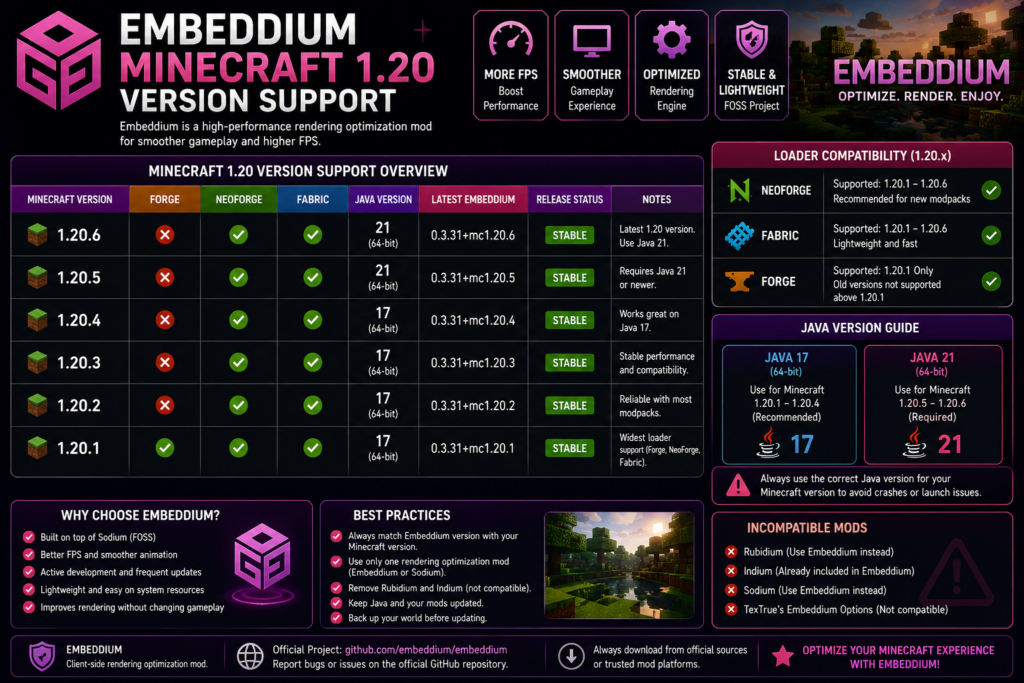
It can use:
Forge
NeoForge
Fabric
The official project currently states that Forge supports 1.20.1 and older, Fabric supports 1.20.1–1.20.6, and NeoForge supports 1.20.1 and newer.
A commonly used official release is:
Embeddium 0.3.31+mc1.20.1The 0.3.31 listing supports Minecraft 1.20.1 on Forge and NeoForge and is client-side.
Recommended 1.20.1 combination
For a normal Forge setup:
Minecraft 1.20.1
Forge 47.x
Java 17, 64-bit
Embeddium 0.3.31+mc1.20.1
Forge’s official 1.20.1 documentation requires a 64-bit Java 17 environment.
Forge or NeoForge for 1.20.1?
NeoForge’s own user guide notes that although NeoForge exists for Minecraft 1.20.1, Forge is generally recommended for that particular version because Forge received longer support there.
Older Compatible Versions
Minecraft 1.19.2
Embeddium officially lists Minecraft 1.19.2 and provides Forge builds for it. Java 17 is appropriate for the Minecraft 1.18–1.19 generation.
Minecraft 1.18.2
Minecraft 1.18.2 is also listed as compatible and uses Forge with Java 17.
Minecraft 1.16.5
Minecraft 1.16.5 remains listed in the Embeddium version archive with Forge builds. The Forge development toolchain maps Minecraft 1.12–1.16 to Java 8.
Older releases remain useful for legacy modpacks, but they should not be mixed with files intended for modern Minecraft versions.
Java Version Compatibility
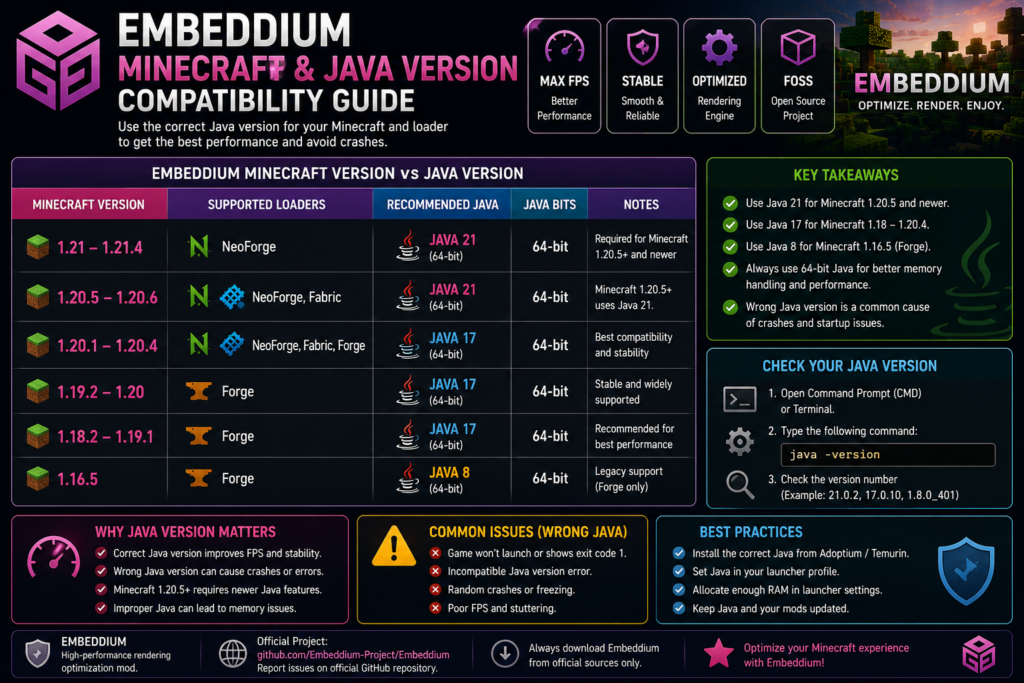
Use this quick Java table:
| Minecraft version | Recommended Java |
|---|---|
| 1.21–1.21.4 | Java 21 |
| 1.20.5–1.20.6 | Java 21 |
| 1.20.1–1.20.4 | Java 17 |
| 1.18.2–1.19.2 | Java 17 |
| 1.16.5 | Java 8 |
NeoForge documents Java 17 for Minecraft 1.20.2–1.20.4 and Java 21 for Minecraft 1.20.5 and newer. Forge documentation identifies Java 17 for the 1.18–1.20.1 generation and Java 8 for the 1.12–1.16 toolchain.
Check Java
Open Command Prompt or Terminal and enter:
java -versionThe first version number should match the requirement for your selected Minecraft release.
Remember that the Minecraft Launcher may use a different Java executable from the one shown in Command Prompt. Check the profile’s Java executable setting when the terminal version looks correct but the game still reports a Java error.
Client and Server Compatibility
Embeddium is officially classified as a client-side performance mod. Its main function is to optimize rendering on the player’s computer.
It is therefore normally installed in:
Client mods folderrather than being required on an ordinary multiplayer server.
Embeddium cannot directly fix:
- Low server TPS
- Network latency
- High ping
- Server-side entity overload
- Slow hosting hardware
- Delayed server actions
A modpack or server administrator may still include it in a client distribution, but its performance work occurs locally.
How to Choose the Correct Embeddium File
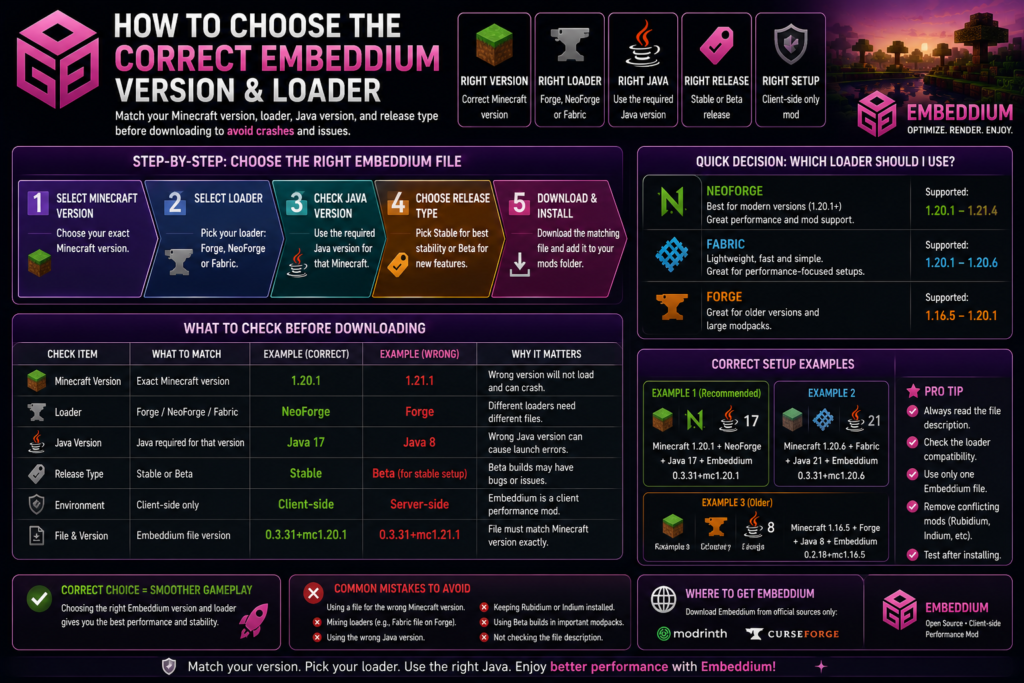
Before downloading, verify all six fields:
| Check | Example |
|---|---|
| Minecraft version | 1.20.1 |
| Loader | Forge |
| Java version | Java 17 |
| Embeddium branch | mc1.20.1 |
| Release type | Stable |
| Environment | Client-side |
Correct example
Minecraft 1.20.1
Forge 47.x
Java 17
Embeddium 0.3.31+mc1.20.1
Incorrect example
Minecraft 1.20.1
Forge
Java 17
Embeddium 1.0.15+mc1.21.1
The second setup fails because the Embeddium file was built for Minecraft 1.21.1 and NeoForge.
Common Version Compatibility Errors
Mod Is for a Different Minecraft Version
The loader may display a message saying the installed Embeddium file requires another version of Minecraft.
Fix
Download the file listing your exact game version. Renaming the JAR does not change its compatibility.
Wrong Loader File
A Fabric JAR will not automatically work in Forge or NeoForge.
Fix
Confirm the platform field on the download page and replace the file with the correct loader build.
Wrong Java Version
Typical examples include:
Java 17 used with Minecraft 1.21.1
Java 21 profile incorrectly configured
32-bit Java
Broken custom Java path
Use Java 21 for Minecraft 1.20.5 and newer supported releases and Java 17 for Minecraft 1.20.1–1.20.4.
Duplicate Embeddium Files
Do not keep multiple versions together:
embeddium-old.jar
embeddium-new.jar
Keep only the one file matching the active profile.
Rubidium Installed with Embeddium
Rubidium is listed as incompatible on several official Embeddium release pages because both mods replace overlapping rendering systems.
Indium Installed with Embeddium
Embeddium includes integrated Fabric Rendering API support. The project states that Indium is no longer required and will not work with Embeddium.
Safe Upgrade Between Minecraft Versions
Do not directly replace the JAR inside an old profile when moving between major Minecraft versions.
Use this process:
- Back up worlds, mods, and configurations.
- Create a new game directory.
- Install the matching Minecraft version.
- Install the correct loader.
- Select the required Java version.
- Add only the matching Embeddium file.
- Launch and test a new world.
- Download compatible versions of other mods.
- Move important worlds only after testing.
For example, moving from Minecraft 1.20.1 Forge to 1.21.1 requires changing the loader from Forge to NeoForge, changing Java 17 to Java 21, and downloading a 1.21.1 Embeddium file.
Frequently Asked Questions
Which Minecraft versions support Embeddium?
The official project currently lists Minecraft 1.21.4, 1.21–1.21.1, 1.20.1–1.20.6, 1.19.2, 1.18.2, and 1.16.5.
Does Embeddium support Minecraft 1.21.4?
Yes. Minecraft 1.21.4 has an official NeoForge beta release named 1.0.12-beta.1+mc1.21.4.
Does Embeddium support Minecraft 1.21.1?
Yes. An official stable NeoForge 1.0.15 release is available for Minecraft 1.21.1.
Does Embeddium work with Minecraft 1.20.1?
Yes. Minecraft 1.20.1 supports Embeddium across Forge, Fabric, and NeoForge branches.
Does Embeddium support Forge?
Yes, but official Forge support applies to Minecraft 1.20.1 and older compatible versions.
Does Embeddium support NeoForge?
Yes. NeoForge support begins at Minecraft 1.20.1 and continues through the newer Minecraft releases currently listed by the project.
Does Embeddium support Fabric?
Yes. Official Fabric support covers Minecraft 1.20.1 through 1.20.6.
Is Minecraft 1.21.2 supported?
Minecraft 1.21.2 is not included in the current official compatibility list. Use only a file page that explicitly lists 1.21.2 before installing it.
Can I use a 1.21.1 file on Minecraft 1.21.4?
No. These are separate Minecraft releases with separate Embeddium builds. Use the specific 1.21.4 NeoForge beta file.
Which Minecraft version is best for Embeddium?
Minecraft 1.20.1 provides the broadest loader choice, while Minecraft 1.21.1 provides a newer stable NeoForge release. The best choice depends on the versions required by the rest of your modpack.
Which Java version does Embeddium need?
Java requirements follow the Minecraft and loader version: Java 21 for Minecraft 1.20.5 and newer, Java 17 for Minecraft 1.18 through 1.20.4, and Java 8 for the legacy Minecraft 1.16.5 branch.
Can Embeddium be installed on a server?
Embeddium is classified as client-side and normally does not need to be installed on an ordinary server.
Conclusion
Embeddium Compatible Minecraft Versions currently include Minecraft 1.21.4, 1.21–1.21.1, 1.20.1–1.20.6, 1.19.2, 1.18.2, and 1.16.5.
Use Forge for Minecraft 1.20.1 and older supported versions, Fabric for Minecraft 1.20.1–1.20.6, and NeoForge for supported versions beginning with Minecraft 1.20.1. Always match the exact Minecraft version, loader, Java release, and Embeddium file before launching the game.