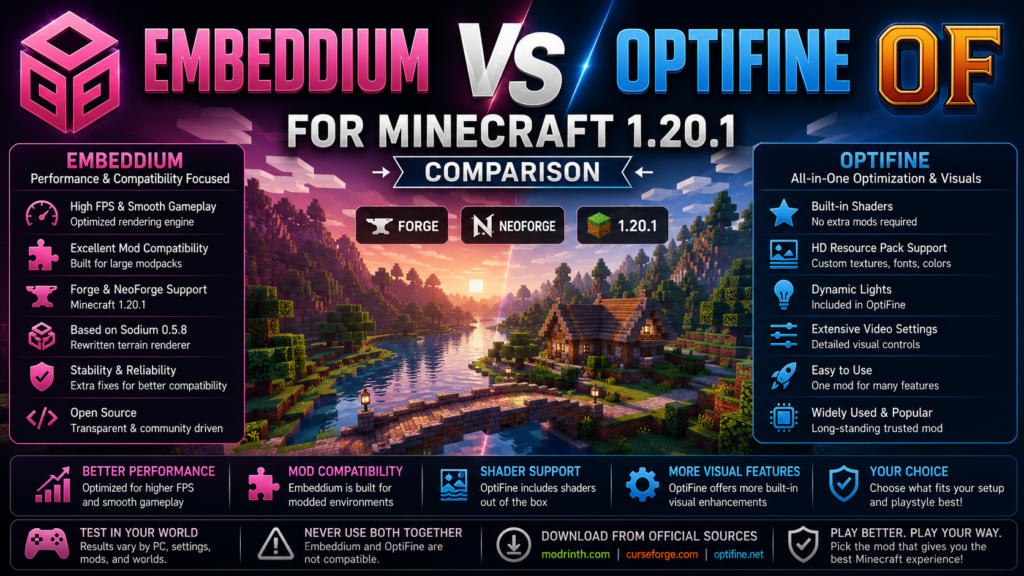
Choosing between Embeddium vs OptiFine for Minecraft 1.20.1 depends on whether you prioritize modpack compatibility and rendering performance or prefer an all-in-one package containing shaders, HD resource-pack features, dynamic lights, and extensive graphical controls.
Embeddium is a client performance mod based on the last freely licensed Sodium codebase. It includes Sodium 0.5.8-era rendering optimizations, a rewritten terrain renderer, rendering-pipeline improvements, and additional fixes intended to improve compatibility with other mods. OptiFine is a long-established optimization and graphics mod that combines performance options with built-in shader support, HD texture features, dynamic lights, and detailed visual controls.
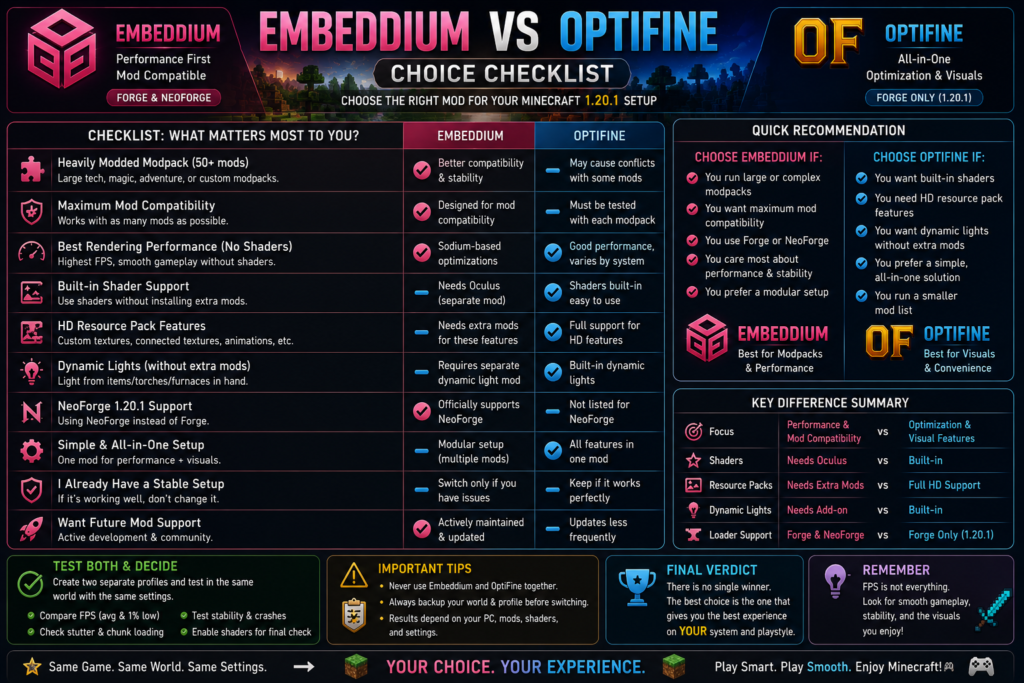
Quick Verdict
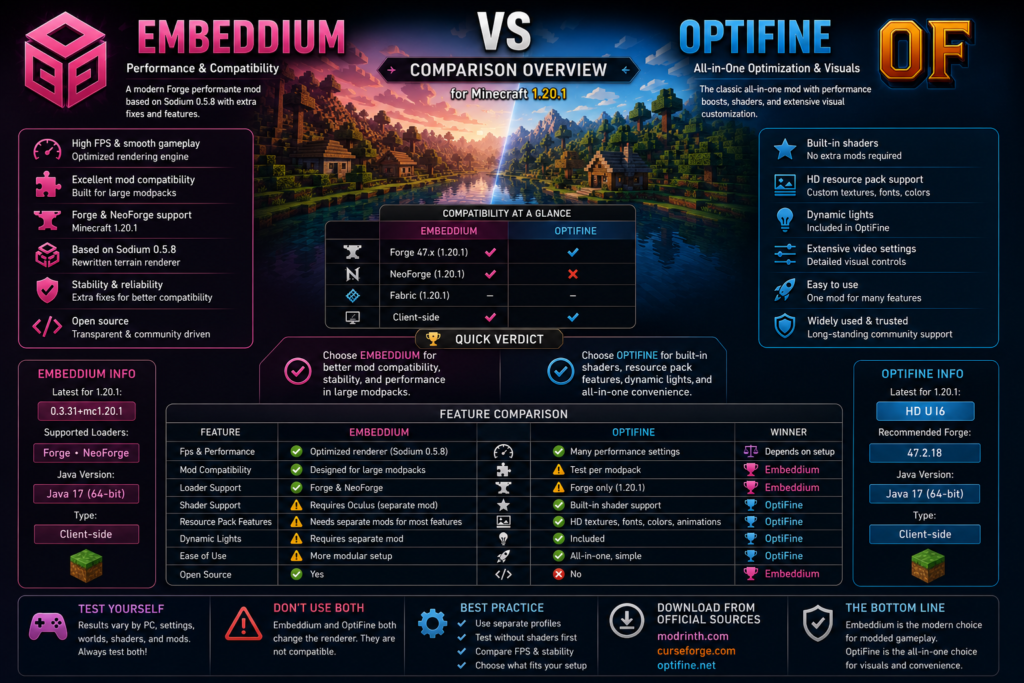
For a large or heavily modded Forge 1.20.1 profile, Embeddium is generally the better starting choice because its project explicitly prioritizes reliability and mod compatibility. For a smaller installation where built-in shaders and advanced resource-pack features matter more than broad mod integration, OptiFine may be more convenient. This recommendation is an inference based on the different priorities stated by the two projects, not a guaranteed performance result.
| Your main priority | Better starting choice |
|---|---|
| Heavily modded Forge profile | Embeddium |
| Maximum mod compatibility | Embeddium |
| Rendering performance focus | Embeddium first |
| Built-in shader menu | OptiFine |
| HD resource-pack features | OptiFine |
| Dynamic lights without another mod | OptiFine |
| NeoForge 1.20.1 profile | Embeddium |
| Simple standalone installation | OptiFine |
| Existing stable OptiFine setup | Keep OptiFine |
| Modpack specifically requiring one | Follow the modpack |
Neither mod is guaranteed to produce more FPS on every computer. Results vary with the processor, graphics card, driver, Java configuration, world complexity, render distance, shaders, resource packs, and other installed mods.
Embeddium vs OptiFine Comparison
| Feature | Embeddium | OptiFine |
|---|---|---|
| Primary focus | Performance and mod compatibility | Performance and visual customization |
| Minecraft version | 1.20.1 build available | 1.20.1 build available |
| Forge support | Yes | Yes |
| NeoForge support | Yes | Not listed on official 1.20.1 download |
| Client-side | Yes | Yes |
| Rendering base | Sodium 0.5.8-era code | Independent OptiFine renderer changes |
| Terrain renderer rewrite | Yes | Uses its own optimizations |
| Built-in shaders | No | Yes |
| Shader option for Forge | Oculus required | Included |
| HD texture features | Separate mods may be needed | Included |
| Dynamic lights | Separate mod normally needed | Included |
| Mod integration focus | Strong | Must be tested per modpack |
| Best use case | Large Forge modpacks | Visual and shader-focused setups |
| Java for Forge 1.20.1 | Java 17 | Java 17 |
| Install both together | No | No |
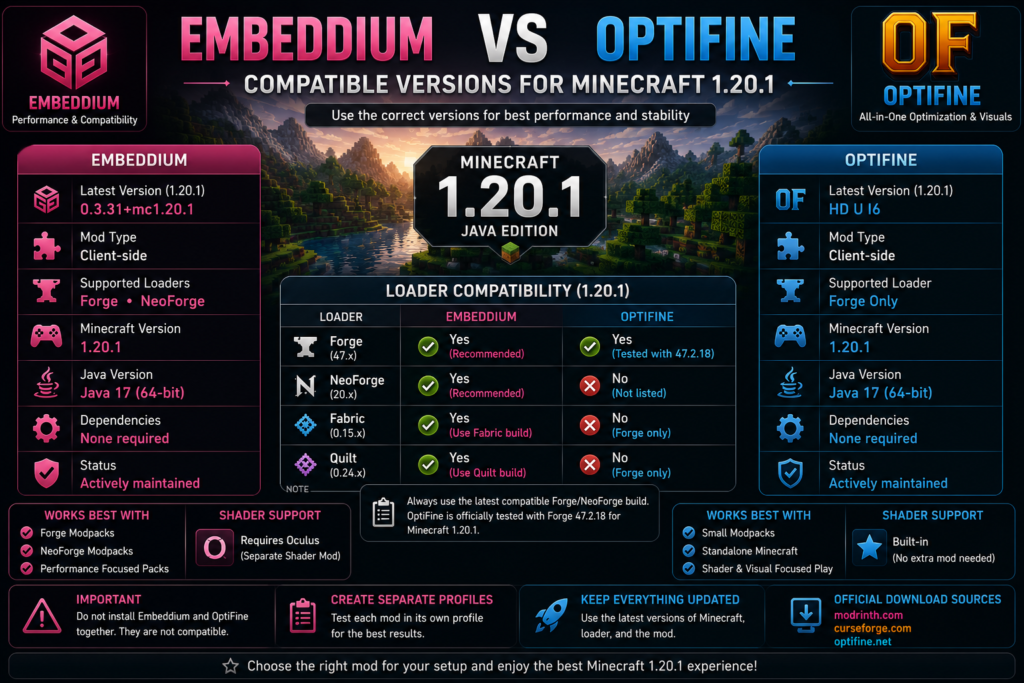
Official listings provide Embeddium 0.3.31+mc1.20.1 for Forge and NeoForge. OptiFine’s official download page provides OptiFine HD U I6 for Minecraft 1.20.1 and associates it with Forge 47.2.18. Forge 1.20.1 uses a 64-bit Java 17 environment.
What Is Embeddium?
Embeddium is a free, open-source client performance mod based on the last freely licensed Sodium codebase. It includes Sodium performance improvements through version 0.5.8, including a rewritten terrain renderer and optimizations affecting entities, graphical interfaces, block entities, and other immediate-mode rendering tasks.
The project also emphasizes:
- Mod compatibility fixes
- Additional rendering features
- Forge support for Minecraft 1.20.1 and older
- Fabric and NeoForge support for newer supported branches
- Integrated Fabric Rendering API support
- Client-side installation
The official Minecraft 1.20.1 release currently listed is:
Embeddium 0.3.31+mc1.20.1That release supports Minecraft Java Edition 1.20.1 on Forge and NeoForge and is classified as client-side.
What Is OptiFine?
OptiFine is a Minecraft optimization and graphics mod intended to improve performance while adding extensive visual configuration. Its official feature list includes FPS-oriented optimizations, HD texture support, shader support, dynamic lights, configurable render distance, smooth-lighting controls, fog options, mipmaps, and other graphical settings.
The official Minecraft 1.20.1 download currently listed is:
OptiFine HD U I6The download page associates this release with Forge 47.2.18. An older Minecraft 1.20.1 release, OptiFine HD U I5, is also listed with Forge 47.0.35.
OptiFine can also be installed as a standalone Minecraft profile. However, this comparison focuses mainly on Forge because Embeddium is installed through a mod loader.
Recommended Minecraft 1.20.1 Setups
Embeddium Setup
Use this as a clean starting point:
| Component | Recommended check |
|---|---|
| Minecraft | Java Edition 1.20.1 |
| Loader | Forge or NeoForge |
| Java | Java 17, 64-bit |
| Embeddium | 0.3.31+mc1.20.1 |
| Shaders | Off for first test |
| Additional renderer | None |
| Environment | Client-side |
The official Embeddium release supports Forge and NeoForge, while Forge documentation identifies Java 17 and a 64-bit JVM as the correct environment for Minecraft 1.20.1.
OptiFine Setup
Use this official pairing as the initial reference:
| Component | Recommended check |
|---|---|
| Minecraft | Java Edition 1.20.1 |
| Loader | Forge |
| Java | Java 17, 64-bit |
| OptiFine | HD U I6 |
| Forge reference | 47.2.18 |
| Shaders | Built in |
| Environment | Client-side |
The official OptiFine download page lists HD U I6 with Forge 47.2.18. Do not assume that every later Forge 47.x build will behave identically; use a separate test profile when your modpack requires a different Forge build.
Performance Comparison
Terrain Rendering
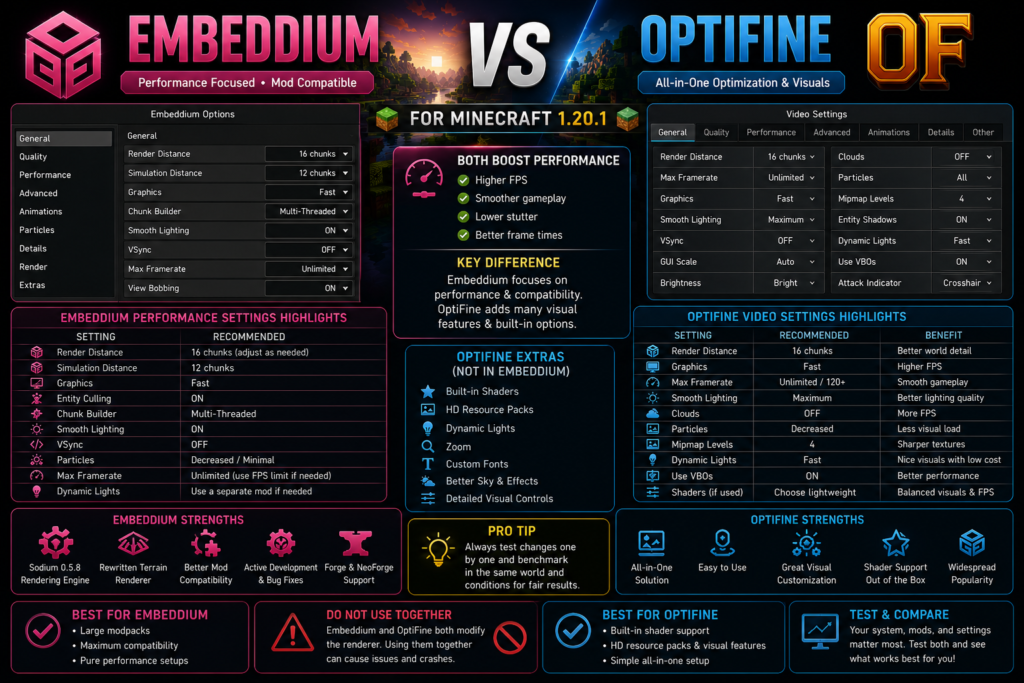
Embeddium includes a rewritten terrain renderer inherited from Sodium 0.5.8-era development. It also optimizes rendering paths used by entities, interfaces, and block entities. These changes make it a strong performance-focused option for Forge modpacks.
OptiFine also includes performance optimizations and provides numerous settings for controlling render distance, animations, fog, smooth lighting, chunk loading, and other visual effects. Its official site says that many optimizations work without requiring the user to configure every setting manually.
Which Mod Gives More FPS?
There is no reliable universal winner.
Embeddium may perform better when:
- The profile contains many Forge mods.
- Rendering compatibility is the primary concern.
- Shaders and advanced visual effects are disabled.
- The game is CPU-limited by chunk and entity rendering.
- The other mods were designed or tested around Embeddium.
OptiFine may perform well when:
- The profile is small.
- Its default optimizations suit the computer.
- Expensive visual options remain disabled.
- The user wants one mod for both performance and visuals.
- The resource pack depends on OptiFine-specific features.
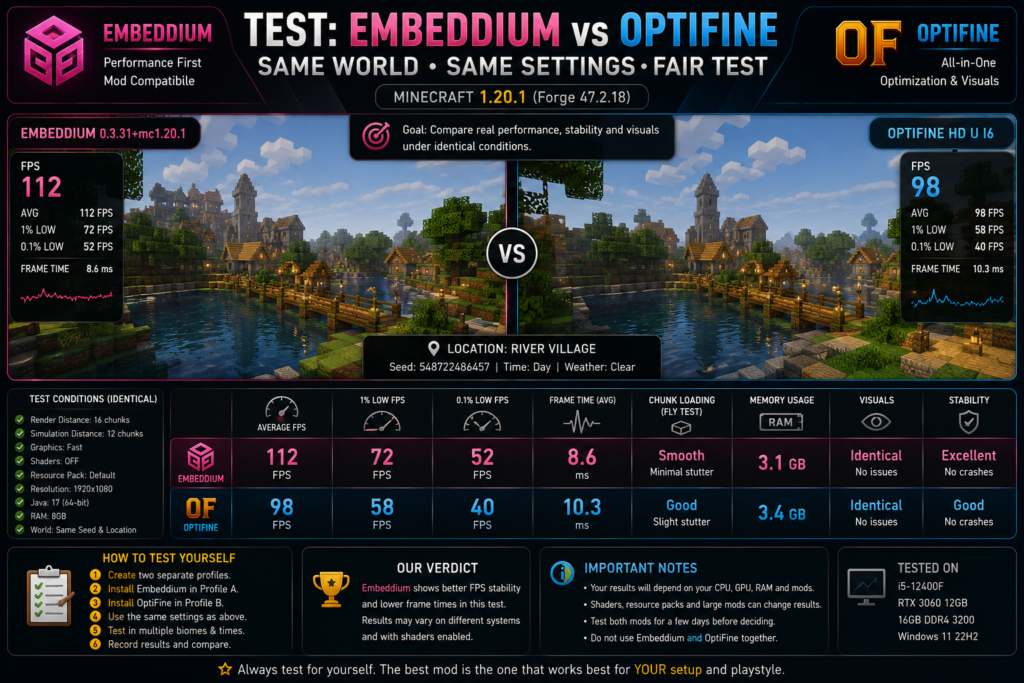
Do not use invented benchmark figures in this article. The only dependable comparison is one performed on the same computer, world, settings, loader, resolution, and mod list.
Average FPS vs Smooth Gameplay
The highest FPS number is not always the best result.
Compare:
- Average FPS
- Minimum FPS
- One-percent-low FPS
- Frame-time spikes
- Chunk-loading stutter
- World-loading time
- Visual glitches
- Crash frequency
- Temperature and fan noise
A profile that maintains 80 FPS consistently may feel better than one fluctuating between 70 and 160 FPS.
Mod Compatibility
Embeddium explicitly describes itself as prioritizing reliability and mod compatibility. Its project includes additional fixes and integration features beyond the Sodium codebase on which it was built.
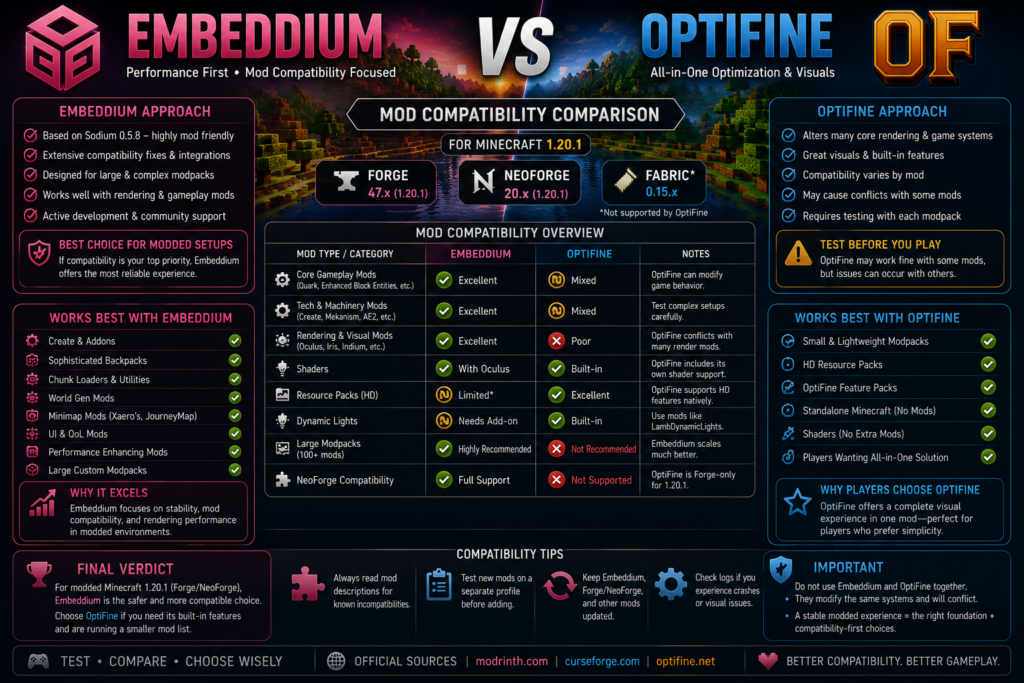
OptiFine emphasizes graphical customization, HD textures, shaders, dynamic lighting, and performance options. Because it modifies many areas of Minecraft’s rendering and resource systems, every large modpack should be tested before OptiFine is adopted. The recommendation to prefer Embeddium in large modpacks is an inference from the project’s stated designs, not a claim that OptiFine conflicts with every mod.
Better Choice for Large Forge Modpacks
Choose Embeddium first when the profile includes:
- Create-based mods
- Large technology modpacks
- Custom block renderers
- Entity-rendering extensions
- Many interface mods
- Complex animated block entities
- Mod-specific rendering APIs
- A modpack that already recommends Embeddium
When OptiFine May Be Suitable
OptiFine may still be suitable when:
- The mod list is small.
- Every important mod has been tested with it.
- The resource pack requires OptiFine features.
- Built-in shader management is essential.
- The game already runs reliably with OptiFine.
- The user prefers a standalone installation.
Do not replace a stable renderer merely because another player reports a higher FPS number.
Shader Support
OptiFine Shaders
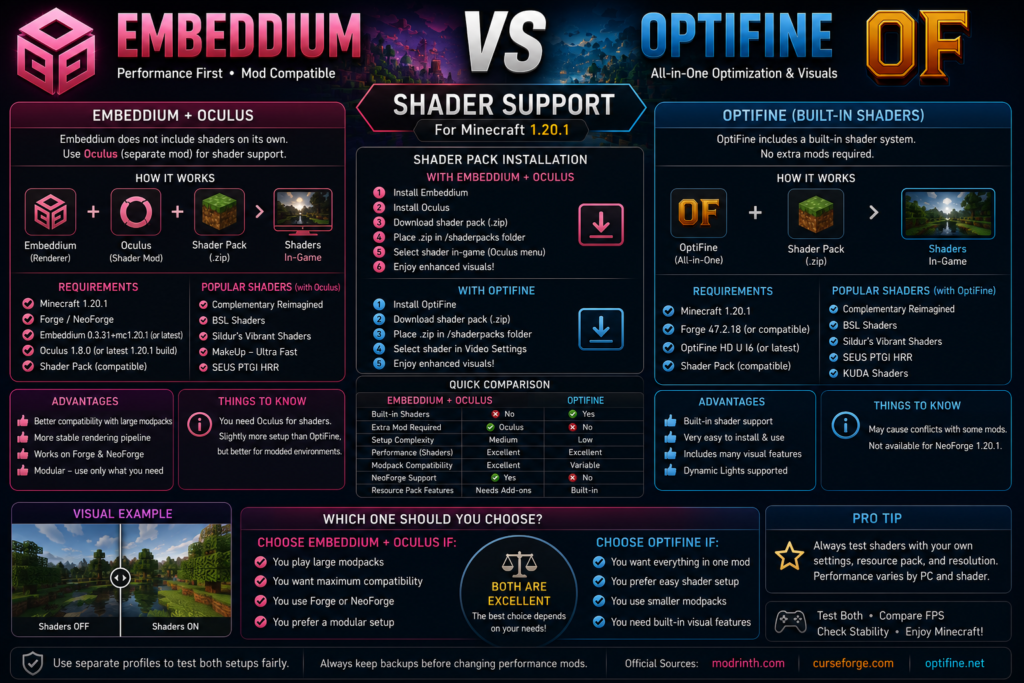
OptiFine includes shader support directly. A compatible shader pack can be placed in the shaderpacks folder and selected from the video-settings interface without adding a separate shader-loader mod. Shader support is one of OptiFine’s officially advertised features.
A normal OptiFine shader setup contains:
Minecraft 1.20.1
Forge 47.2.18
OptiFine HD U I6
Compatible shader pack
Embeddium Shaders
Embeddium does not provide a complete shader menu by itself. On Minecraft 1.20.1 Forge or NeoForge, Oculus can be used as a separate shader solution.
The official Oculus 1.20.1-1.8.0 release supports Minecraft 1.20.1 on Forge and NeoForge, runs client-side, and lists compatible Embeddium content as required.
A typical Embeddium shader setup is:
Minecraft 1.20.1
Forge or NeoForge
Embeddium 0.3.31
Oculus 1.8.0
Compatible shader pack
Test Embeddium without Oculus or shaders first. Once the base installation runs correctly, add Oculus and one shader pack.
Shader Winner
OptiFine wins for simplicity because shader support is included.
Embeddium plus Oculus may be preferable for a Forge modpack that already relies on Embeddium’s compatibility features.
Shader performance and stability still depend on the shader pack, graphics driver, GPU, resolution, and remaining mod list.
Resource-Pack Features
OptiFine includes extensive support for HD textures and custom resource-pack behavior. Its official documentation describes features involving custom textures, colors, lighting, fonts, animated textures, and other property-driven resource-pack options.
Embeddium is primarily a rendering-performance mod rather than a complete OptiFine resource-pack replacement. Users may need separate compatible mods for features such as:
- Connected textures
- Custom entity models
- Custom entity textures
- Custom item textures
- Dynamic lights
- Custom skies
- Zoom
- Additional resource-pack animations
Resource-Pack Winner
Choose OptiFine when the resource pack specifically requires OptiFine features.
Choose Embeddium when performance and general mod compatibility are more important, and install only the separate visual-feature mods you actually need.
Dynamic Lights
OptiFine includes dynamic lights as a built-in feature. Handheld or dropped light-emitting items can illuminate nearby objects when the setting is enabled.
Embeddium does not position itself as an all-in-one visual-feature package. A separate dynamic-lighting mod is normally required when that effect is wanted.
OptiFine is therefore more convenient for users who want dynamic lighting without installing another mod.
Video Settings
Embeddium Settings
Embeddium generally focuses on renderer and performance settings, including areas such as:
- Render distance
- Simulation distance
- Graphics quality
- Chunk rendering
- Culling
- Entity rendering
- Translucency behavior
- Performance options
Its exact interface can differ by Embeddium release and installed addons.
OptiFine Settings
OptiFine provides a wider collection of performance and visual controls, including:
- Shaders
- Quality
- Details
- Animations
- Performance
- Dynamic lights
- Fog
- Smooth lighting
- Mipmaps
- Render-distance controls
- HD resource-pack options
Many of these capabilities appear in OptiFine’s official feature documentation.
Settings Winner
OptiFine offers more built-in visual controls.
Embeddium offers a more focused renderer configuration and can be extended using separate mods. Users who prefer modular installations may find Embeddium easier to customize without enabling unwanted visual features.
Forge and NeoForge Compatibility
Embeddium 0.3.31+mc1.20.1 officially supports both Forge and NeoForge.
OptiFine’s official Minecraft 1.20.1 listing associates HD UI6 with Forge 47.2.18 and does not list NeoForge for that release. Therefore:
Forge 1.20.1 → Embeddium or OptiFine
NeoForge 1.20.1 → Embeddium
The NeoForge recommendation is based on the platforms listed by the official project pages.
Can Embeddium and OptiFine Be Installed Together?
Do not install both in the same profile.
Embeddium and OptiFine both make substantial changes to Minecraft’s client renderer and performance systems. Treating them as alternatives rather than stacking them is a technical inference based on their stated functions. Combining renderer replacements can lead to mixin conflicts, broken visuals, startup errors, or settings that do not behave correctly.
Use:
Embeddiumor:
OptiFinenot both.
Which Is Better for Low-End PCs?
Start with Embeddium when:
- The profile is heavily modded.
- The processor struggles during chunk loading.
- The user wants performance without shaders.
- Compatibility with other Forge mods matters.
- Only necessary visual features will be installed.
Start with OptiFine when:
- The profile is small or standalone.
- Built-in settings are preferred.
- Shaders are optional and normally disabled.
- Dynamic lights or OptiFine resource packs are needed.
- The user does not want several separate visual mods.
On a very weak computer, shaders, high-resolution resource packs, long render distance, and maximum visual settings can reduce performance regardless of which optimization mod is installed.
Which Is Better for Shaders?
Choose OptiFine when you want:
- Built-in shader selection
- A simpler one-mod visual setup
- OptiFine-specific resource-pack features
- Dynamic lights included
Choose Embeddium plus Oculus when you want:
- Embeddium’s mod-oriented renderer
- A Forge or NeoForge modpack
- Separate control over the performance and shader components
- A setup specifically documented around Embeddium and Oculus
Oculus 1.8.0 officially requires a compatible Embeddium installation for Minecraft 1.20.1.
How to Test Embeddium vs OptiFine Fairly
Step 1: Create Separate Profiles
Create:
Profile A: Embeddium
Profile B: OptiFine
Never test both inside the same profile.
Step 2: Use Matching Conditions
Keep these equal:
- Minecraft 1.20.1
- Java 17
- Resolution
- RAM allocation
- World and seed
- Render distance
- Simulation distance
- Graphics quality
- Resource pack
- Shader status
- Background programs
Loader builds may differ because OptiFine HD UI 6 officially references Forge 47.2.18.
Step 3: Disable Shaders
Run the first comparison without shaders.
This measures the baseline renderer performance rather than the performance of a particular shader pack.
Step 4: Test Several Locations
Use:
- Open plains
- Dense forest
- Village
- Large base
- Entity-heavy farm
- Modded machinery area
- Newly generated chunks
Step 5: Record the Results
| Metric | Why it matters |
|---|---|
| Average FPS | Overall performance |
| Minimum FPS | Severe drops |
| One-percent lows | Repeatable slowdowns |
| Frame time | Smoothness |
| Chunk loading | Terrain-renderer behavior |
| Memory use | System load |
| Temperature | Hardware workload |
| Visual issues | Rendering correctness |
| Crashes | Profile stability |
Run the same route at least three times. Ignore fabricated benchmark numbers from promotional graphics.
Switching from OptiFine to Embeddium
- Back up the profile and worlds.
- Close Minecraft and the launcher.
- Remove the OptiFine JAR.
- Remove OptiFine-only addons.
- Check whether the resource pack requires OptiFine.
- Install the matching Embeddium file.
- Launch without Oculus or shaders.
- Confirm that a new world loads.
- Add Oculus only when shaders are required.
- Add separate visual-feature mods gradually.
Do not copy an old OptiFine configuration directly into Embeddium.
Switching from Embeddium to OptiFine
- Back up the profile.
- Remove Embeddium.
- Remove Oculus and Embeddium-specific addons.
- Confirm the Forge version used by the profile.
- Install the correct OptiFine 1.20.1 file.
- Launch without shaders.
- Test the existing mod list.
- Enable visual options gradually.
- Add one shader pack.
- Read the latest log when any problem appears.
The official OptiFine listing associates Minecraft 1.20.1 HD UI6 with Forge 47.2.18.
Frequently Asked Questions
Is Embeddium better than OptiFine for Minecraft 1.20.1?
Embeddium is generally the better starting choice for large Forge or NeoForge modpacks because it explicitly prioritizes mod compatibility. OptiFine may be better for smaller installations requiring built-in shaders and HD resource-pack features.
Does Embeddium give more FPS than OptiFine?
No universal result is guaranteed. Embeddium includes Sodium 0.5.8-era renderer optimizations, while OptiFine provides its own performance controls. Test both separately under identical conditions.
Can Embeddium and OptiFine be installed together?
No. Both substantially modify the Minecraft renderer and should be used as alternatives rather than installed together.
Which Embeddium version supports Minecraft 1.20.1?
The official release listing provides Embeddium 0.3.31+mc1.20.1 for Forge and NeoForge.
Which OptiFine version supports Minecraft 1.20.1?
The official OptiFine page lists HD U I6 for Minecraft 1.20.1 and associates it with Forge 47.2.18.
Which mod is better for Forge 1.20.1?
Both provide Minecraft 1.20.1 options. Embeddium is usually the safer first test for a large modpack, while OptiFine is useful when its visual and resource-pack features are required.
Which mod supports NeoForge 1.20.1?
Embeddium officially supports NeoForge on Minecraft 1.20.1. OptiFine’s official 1.20.1 listing specifies Forge rather than NeoForge.
Does Embeddium include shaders?
No. Install a compatible shader solution such as Oculus. The official Oculus 1.8.0 release supports Minecraft 1.20.1 and requires compatible Embeddium content.
Does OptiFine include shaders?
Yes. Shader support is included among OptiFine’s official features.
Does Embeddium include dynamic lights?
Embeddium focuses on rendering performance rather than serving as an all-in-one visual package. A separate compatible mod is normally used for dynamic lighting.
Does OptiFine include dynamic lights?
Yes. Dynamic lights are listed as a built-in OptiFine feature.
Which mod is better for resource packs?
OptiFine is better for packs that require OptiFine-specific HD textures, custom models, colors, animations, or property files. Embeddium users can recreate many features through separate compatible mods.
Which Java version should I use?
Use a 64-bit Java 17 environment for Forge Minecraft 1.20.1.
Are Embeddium and OptiFine server mods?
They primarily change client rendering and graphics. Install the selected mod in the player’s local profile rather than expecting it to fix server TPS, ping, or server-side processing.
Conclusion
Embeddium vs OptiFine for Minecraft 1.20.1 has no single winner for every player.
Choose Embeddium for large Forge modpacks, NeoForge profiles, modular performance setups, and installations where broad mod compatibility is the main priority. Choose OptiFine for built-in shaders, dynamic lights, HD resource-pack features, and a simpler all-in-one visual package.
For most heavily modded Minecraft 1.20.1 Forge installations, start with Embeddium. For a smaller visual-focused profile, test OptiFine. Use separate profiles and compare stability, frame times, chunk loading, and visual correctness rather than relying only on maximum FPS.