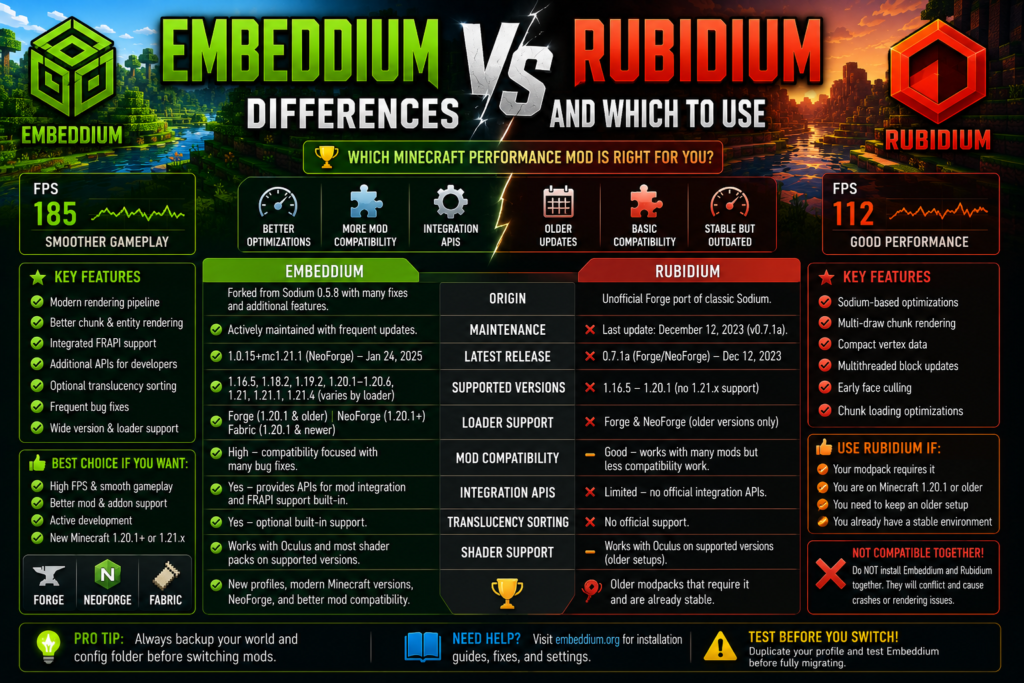
Embeddium and Rubidium are client-side Minecraft performance mods designed to improve chunk rendering, reduce rendering overhead, and provide smoother frame delivery. Both projects originated from Sodium’s rendering technology, but they now differ significantly in maintenance, supported versions, loader coverage, mod integration, and long-term suitability.
Rubidium was created as an unofficial Sodium fork for Forge Mod Loader. Embeddium later built on that work while prioritizing reliability, additional bug fixes, mod compatibility, and APIs that other mods can use for integration. The official Embeddium project also credits Asek3 for the initial Forge port that helped form the project’s foundation.
For most current Minecraft profiles, Embeddium is the more practical default. Rubidium may still be relevant for an older modpack that was specifically assembled and tested around it, but the two mods should never be installed together.
Quick Verdict
Choose Embeddium when:
- You are creating a new Forge or NeoForge profile
- You need stronger current mod compatibility
- You use Minecraft 1.20.1 or a supported newer release
- You want frequent compatibility-oriented patches
- A modpack recommends Embeddium
- You want built-in integration features
- You may use Oculus, Distant Horizons, or other modern rendering addons
Choose Rubidium only when:
- An older modpack explicitly requires it
- The complete modpack was tested with a specific Rubidium version
- Replacing it breaks an essential legacy dependency
- You are preserving an existing profile instead of modernizing it
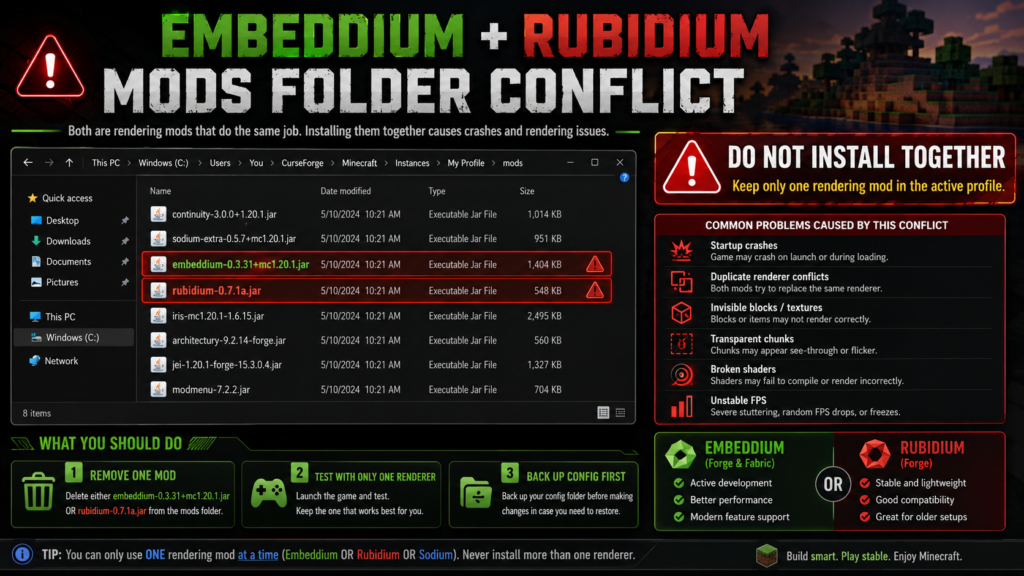
Do not install both. Official Embeddium release pages identify Rubidium as a known incompatibility.
What Is Embeddium?
Embeddium is a free and open-source client performance mod based on the last FOSS-licensed Sodium codebase. Its official project describes it as a reliability- and compatibility-focused rendering mod with additional bug fixes, features, integration APIs, and optional translucency sorting.
Its major features include:
- A rewritten terrain renderer
- Immediate-mode rendering optimizations
- Improved entity and block-entity rendering
- Integrated Fabric Rendering API support
- Additional APIs for mod developers
- Compatibility-focused patches
- Optional translucency sorting
- Forge, NeoForge, and Fabric builds across supported versions
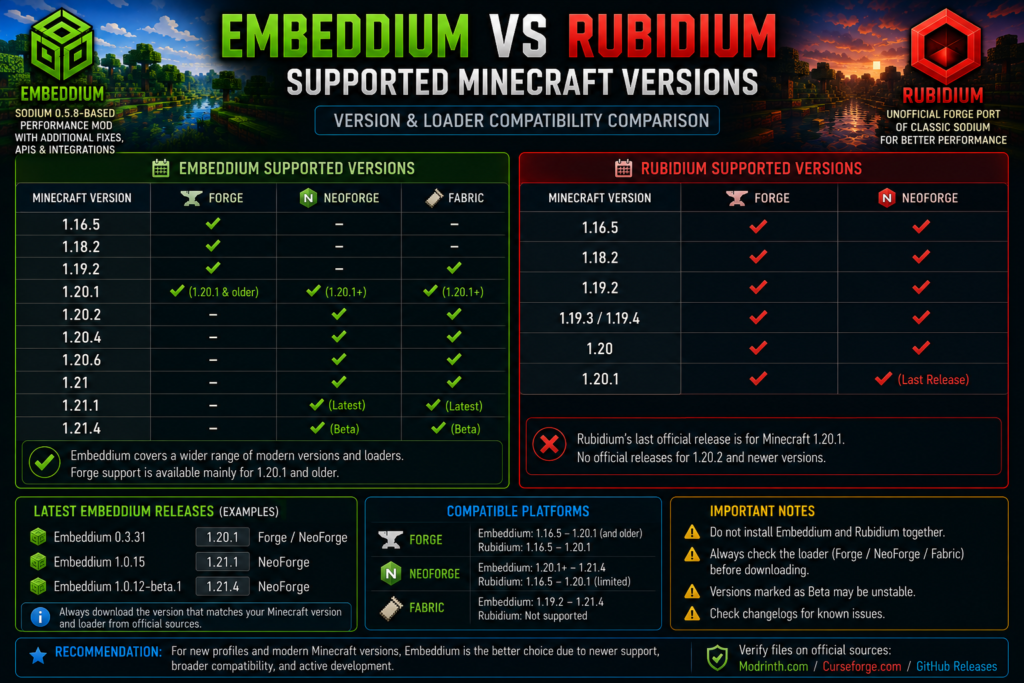
Embeddium supports Forge primarily on Minecraft 1.20.1 and older, while Fabric and NeoForge builds are available for Minecraft 1.20.1 and newer.
The project page currently lists support across versions including Minecraft 1.16.5, 1.18.2, 1.19.2, 1.20.1–1.20.6, 1.21, 1.21.1, and 1.21.4, although the correct loader and release channel vary by version.
For exact file combinations, check the Embeddium Compatible Minecraft Versions guide.
What Is Rubidium?
Rubidium is an unofficial fork of Sodium designed to work with Forge Mod Loader. Its official CurseForge description says it contains the core features of classic Sodium, including a modern OpenGL chunk-rendering pipeline, compact chunk vertex data, multithreaded block updates, face culling, and chunk-loading optimizations.
Rubidium supports client-side installations and has files for older Minecraft versions, including:
- Minecraft 1.16.5
- Minecraft 1.18.2
- Minecraft 1.19.x
- Minecraft 1.20
- Minecraft 1.20.1
Its project listings identify Forge and NeoForge as available platforms.
However, its latest CurseForge file is Rubidium 0.7.1a for Minecraft 1.20.1, released on December 12, 2023. The Rubidium project page still shows December 12, 2023 as its last update.
By comparison, the Embeddium CurseForge project received its latest listed update on January 24, 2025 and includes a newer Minecraft 1.21.1 NeoForge release.
This update history is one reason Embeddium is generally the safer choice for a new profile. That conclusion is an inference from the projects’ current release histories and Embeddium’s explicitly stated compatibility focus, not a claim that Rubidium can never work correctly.
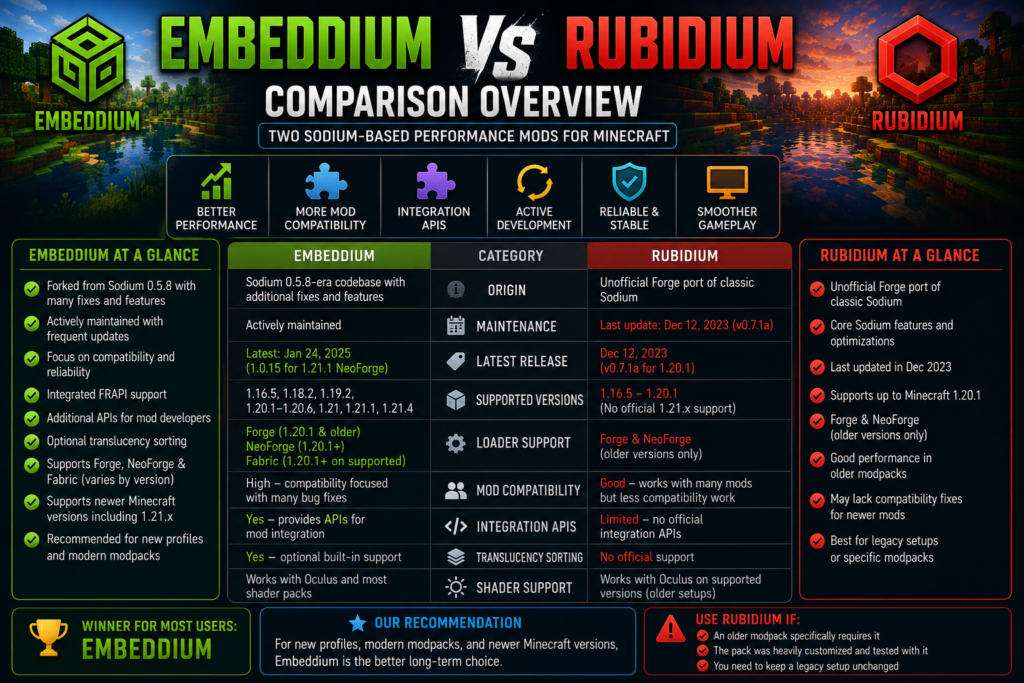
Embeddium vs Rubidium Comparison Table
| Feature | Embeddium | Rubidium |
|---|---|---|
| Base technology | Sodium 0.5.8-era codebase with additional changes | Unofficial Forge port of classic Sodium |
| Main focus | Reliability, compatibility, integrations | Bringing Sodium-style rendering to Forge |
| Current maintenance | More recent listed releases | Last listed update in December 2023 |
| Forge support | Minecraft 1.20.1 and older | Primarily older Forge versions through 1.20.1 |
| NeoForge support | Minecraft 1.20.1 and newer | Listed on project pages, with limited current releases |
| Fabric support | Available on supported releases | No |
| Mod integration APIs | Yes | More limited |
| Integrated FRAPI support | Yes | No equivalent integrated claim |
| Translucency sorting | Optional built-in support | Not listed as an equivalent current feature |
| Install together? | No | No |
| Best use | New and actively maintained profiles | Specific legacy modpacks |
Embeddium officially states that it includes frequent patch updates for reproduced compatibility issues and provides additional APIs for mod integration.
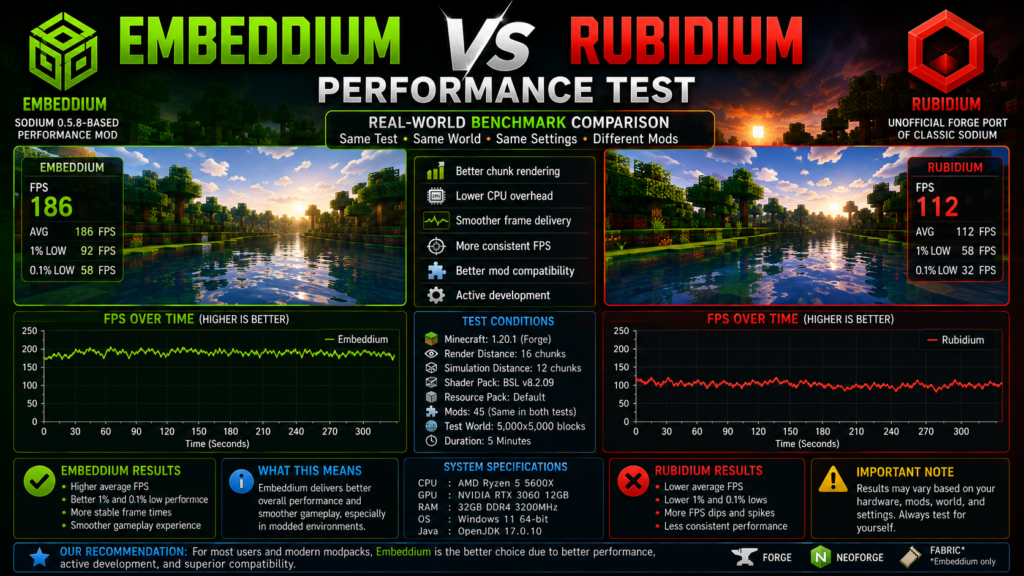
Which Mod Gives Better FPS?
Neither mod is guaranteed to produce more FPS on every computer.
Embeddium and Rubidium share similar Sodium-derived rendering foundations, so both can reduce CPU rendering overhead and improve chunk performance compared with an unoptimized installation. Rubidium’s project description highlights multi-draw chunk rendering, compact vertex data, multithreaded block updates, and early face culling. Embeddium includes Sodium 0.5.8-era performance improvements along with additional compatibility work.
Performance depends on:
- CPU
- GPU
- Graphics drivers
- Minecraft version
- Forge or NeoForge build
- Render distance
- Simulation distance
- Shader pack
- Resource packs
- Modpack size
- World-generation mods
- Entity and block-entity counts
On the same clean profile, average FPS may be similar. Embeddium’s advantage is usually not a guaranteed higher number; it is the project’s broader compatibility focus, newer support, integrations, and bug-fix coverage.
For performance tuning after installation, use the Best Embeddium Settings for Maximum FPS guide.
Weak laptops and integrated-GPU systems should follow the Best Embeddium Settings for Low-End PCs guide instead.
Supported Minecraft Versions
Version support is one of the most important differences.
Embeddium Version Coverage
The official Embeddium project currently lists client-side builds across:
- Minecraft 1.16.5
- Minecraft 1.18.2
- Minecraft 1.19.2
- Minecraft 1.20.1–1.20.6
- Minecraft 1.21
- Minecraft 1.21.1
- Minecraft 1.21.4
It lists Fabric, Forge, and NeoForge as supported platforms, but each release must still be checked individually.
Common examples include:
- Embeddium
0.3.31for Minecraft 1.20.1 Forge/NeoForge - Embeddium
1.0.15for Minecraft 1.21.1 NeoForge - Embeddium
1.0.12-beta.1for Minecraft 1.21.4 NeoForge
Rubidium Version Coverage
Rubidium’s official project pages list support from Minecraft 1.16.5 through Minecraft 1.20.1, with Forge and NeoForge included as project platforms.
Its current CurseForge main file remains:
- Rubidium
0.7.1a - Minecraft 1.20.1
- Forge/NeoForge listing
- Released December 12, 2023
Rubidium does not provide the same current coverage for Minecraft 1.21.x shown by Embeddium’s project pages.
Forge and NeoForge Differences
For Minecraft 1.20.1 Forge, both Embeddium and Rubidium have matching releases. However, Embeddium is usually the recommended choice for a new installation because its project prioritizes mod compatibility and received more recent releases.
For Minecraft 1.21.1 NeoForge, Embeddium has an official 1.0.15 release dated January 24, 2025. Rubidium does not show an equivalent current 1.21.1 release on its official project listings.
Use these general recommendations:
| Profile | Recommended Choice |
| New Forge 1.20.1 profile | Embeddium |
| Existing Rubidium 1.20.1 modpack | Keep it temporarily or migrate carefully |
| NeoForge 1.21.1 profile | Embeddium |
| Minecraft 1.21.4 test profile | Matching Embeddium beta, with caution |
| Older legacy modpack requiring Rubidium | Rubidium, until compatibility is verified |
Use the How to Install Embeddium on Forge 1.20.1 guide for a clean Forge installation.
For NeoForge, follow How to Install Embeddium on NeoForge 1.21.1.
Mod Compatibility
Embeddium’s official description specifically emphasizes additional bug fixes and features for better mod compatibility. It also provides additional APIs that mod developers can use for integration.
These features can matter in modpacks containing:
- Custom block renderers
- Entity-rendering mods
- Shader loaders
- Connected textures
- World-generation mods
- Distant Horizons
- Rendering addons
- Complex machines
- Modded fluids
- Translucent blocks
Rubidium may still work correctly in many older modpacks, especially when the pack was built around one fixed version. The difficulty appears when newer mods or addons expect Embeddium-specific fixes or integrations.
Do not assume an addon supports both merely because its name contains “Rubidium” or “Embeddium.” Always check the exact addon version and dependencies.
Shader Support
Neither Embeddium nor Rubidium provides shader-pack support alone.
Oculus is commonly used for shaders on compatible Forge and NeoForge profiles. However, the required rendering mod may depend on the Oculus release.
Modern Minecraft 1.20.1 setups generally use:
- Embeddium
- Oculus
- One compatible shader pack
For recommended graphics options, use the Best Embeddium and Oculus Settings for Shaders guide.
If Minecraft crashes after enabling shaders, follow the Embeddium and Oculus Crash on Minecraft 1.20.1 guide.
Do not keep Rubidium and Embeddium together to satisfy different addons. Choose one renderer and use addons intended for that renderer and version.
Can Embeddium and Rubidium Be Installed Together?
No.
Embeddium release pages explicitly identify Rubidium as a known incompatibility.
Both mods replace overlapping rendering systems. Installing them together can cause:
- Startup crashes
- Mixin conflicts
- Duplicate renderer errors
- Missing options
- Invisible blocks
- Transparent chunks
- Incorrect lighting
- Broken textures
- Unstable FPS
- Shader failures
Your active mods folder should contain only one:
- Embeddium, or
- Rubidium
Never both.
Should Existing Rubidium Users Switch?
Consider switching when:
- Your Minecraft version supports Embeddium
- A mod requires Embeddium
- Rubidium causes a known rendering issue
- You are rebuilding or modernizing the modpack
- You need a newer Oculus setup
- You are moving to NeoForge
- You want newer compatibility fixes
Do not switch immediately when:
- The modpack is stable
- The pack documentation requires Rubidium
- A critical legacy addon has not been tested with Embeddium
- The profile contains important worlds without backups
- You cannot recreate the current mod list and settings
The safest method is to duplicate the entire profile and test Embeddium in the copy.
How to Replace Rubidium With Embeddium
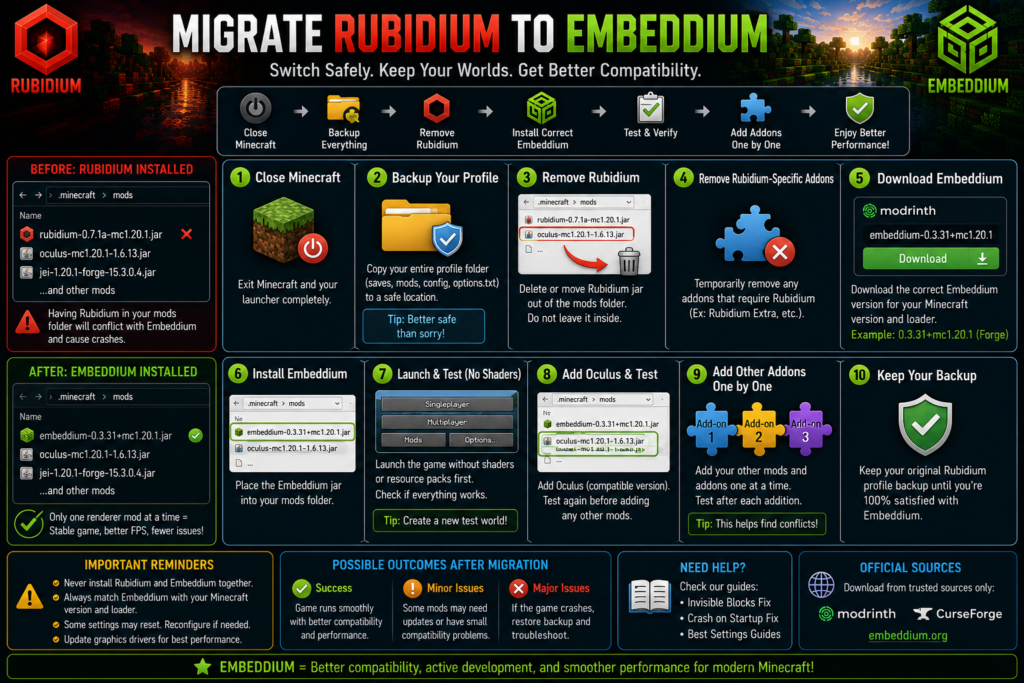
Step 1: Close Minecraft
Exit Minecraft and the launcher completely.
Step 2: Back Up the Profile
Copy:
modsconfigsavesoptions.txtshaderpacks- Resource packs
- The complete launcher instance
Step 3: Record the Current Setup
Write down:
- Minecraft version
- Forge or NeoForge version
- Java version
- Rubidium version
- Oculus version
- Installed rendering addons
Step 4: Remove Rubidium
Move the Rubidium JAR outside the active mods folder.
Do not rename it and leave it inside the folder.
Step 5: Remove Rubidium-Specific Addons Temporarily
Temporarily remove addons that explicitly require Rubidium.
You can add compatible replacements after the base installation works.
Step 6: Install the Correct Embeddium File
Use the Embeddium file matching your:
- Minecraft version
- Loader
- Release channel
Step 7: Launch Without Shaders
Test with:
- Embeddium
- No Rubidium
- Shaders disabled
- Default resource pack
Step 8: Create a New Test World
Check:
- Chunk loading
- Blocks and textures
- Water and glass
- Entities
- Menus
- Frame rate
- Stuttering
Step 9: Add Oculus and Addons Separately
Add one component at a time. This makes conflicts easier to identify.
Step 10: Keep the Backup
Do not delete the original Rubidium profile until Embeddium has been tested successfully.
Will Rubidium Settings Transfer to Embeddium?
Some familiar video options may look similar because both projects derive from Sodium technology, but you should not assume every configuration file transfers perfectly.
Possible outcomes include:
- Existing settings load correctly
- Embeddium creates a new configuration file
- Some values return to defaults
- Addon settings disappear
- Old Rubidium-specific options are ignored
- Option-menu layouts change
The safest approach is to:
- Screenshot your current settings.
- Back up the config folder.
- Let Embeddium generate its own configuration.
- Reapply important values manually.
- Avoid forcing old addon configs into the new setup.
For future version changes, follow How to Update Embeddium Safely Without Losing Settings.
What if Embeddium Causes a Crash After Migration?
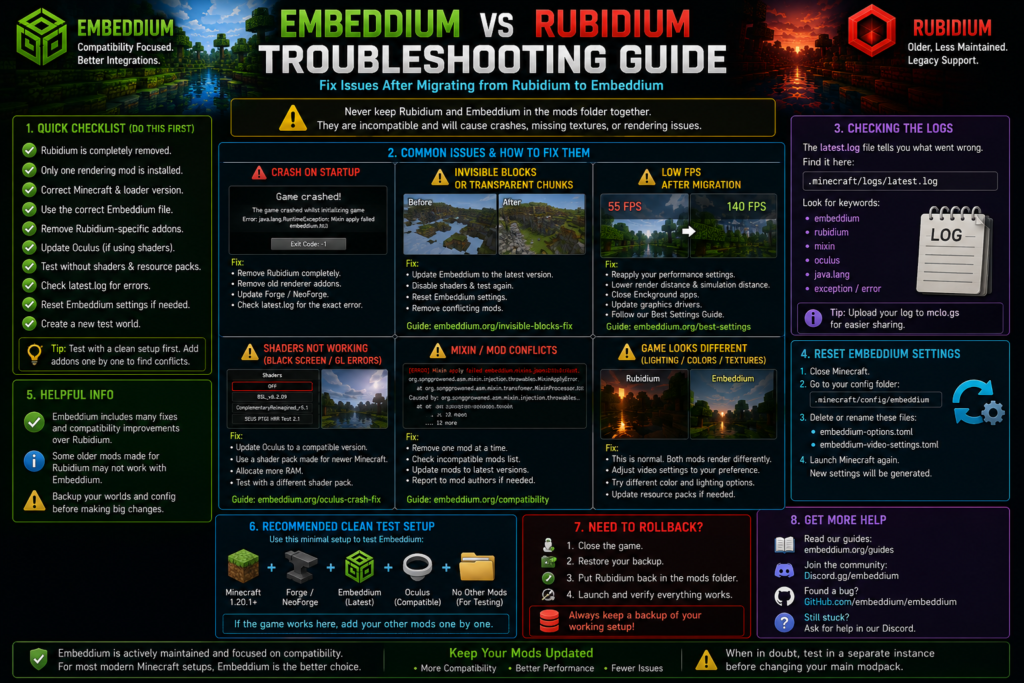
Try this order:
- Confirm Rubidium is completely removed.
- Remove duplicate Embeddium files.
- Verify Minecraft and loader compatibility.
- Disable Oculus temporarily.
- Remove old renderer addons.
- Test without resource packs.
- Reset Embeddium settings.
- Check
latest.log. - Restore the Rubidium backup if necessary.
Use the complete Embeddium Crash on Startup: Causes and Fixes guide for error-specific troubleshooting.
If chunks or blocks disappear, follow the Embeddium Invisible Blocks and Transparent Chunks Fix.
Embeddium vs Rubidium for Modpack Developers
Embeddium is generally the more suitable dependency for a newly maintained modpack because its official project provides additional integration APIs and states that compatibility patches are part of its development focus.
Modpack developers should:
- Pin a tested Embeddium version
- Specify the supported loader
- Include the correct Java version
- Avoid bundling Rubidium and Embeddium
- Test shader-loader combinations
- Document known incompatible addons
- Include rollback instructions
- Test updates in a staging profile
- Avoid promising a fixed FPS increase
Legacy packs should not be changed without testing. Replacing Rubidium can affect shader loaders, option-menu addons, renderer extensions, and configuration files even when base Minecraft launches successfully.
Frequently Asked Questions
Is Embeddium better than Rubidium?
For most new or currently maintained Minecraft profiles, Embeddium is the better default because it has broader platform coverage, newer releases, integration APIs, and an explicit focus on mod compatibility. Rubidium may still be appropriate for a legacy modpack built around it.
Does Embeddium give more FPS than Rubidium?
Not always. Both use Sodium-derived rendering technology. Performance depends on hardware, settings, Minecraft version, drivers, and the rest of the modpack.
Can I install Embeddium and Rubidium together?
No. Official Embeddium release pages list Rubidium as incompatible.
Should I replace Rubidium in an old modpack?
Only after duplicating the profile and testing the replacement. Keep Rubidium when the modpack explicitly requires it and remains stable.
Does Rubidium support Minecraft 1.21.1?
Rubidium’s official project listings currently show versions through Minecraft 1.20.1. Embeddium has an official Minecraft 1.21.1 NeoForge release.
Which mod should I use on Forge 1.20.1?
Use Embeddium for a new Forge 1.20.1 profile. Keep Rubidium only when a specific existing modpack requires it.
Which mod should I use on NeoForge 1.21.1?
Use Embeddium. Its official 1.0.15 release supports Minecraft 1.21.1 NeoForge.
Is Rubidium discontinued?
Its official CurseForge page shows December 12, 2023 as the last update. It is safer to describe it as an older, infrequently updated project rather than claim formal discontinuation without an explicit project announcement.
Can Embeddium use Oculus shaders?
Yes, with a compatible Minecraft 1.20.1 Embeddium and Oculus combination. Test the base profile before enabling a shader pack.
Will my Rubidium settings work with Embeddium?
Some similar options may carry over, but complete compatibility is not guaranteed. Back up configurations and be prepared to recreate settings manually.
Does Embeddium work on Fabric?
Embeddium’s official project supports Fabric on applicable Minecraft 1.20.1 and newer releases. Rubidium does not list Fabric support.
Do I need Indium with Embeddium?
No. Embeddium includes integrated Fabric Rendering API support, and its official project states that Indium is no longer required and will not work with Embeddium.
Can I use OptiFine with either mod?
It is generally unsafe to combine OptiFine with another primary renderer. Use one rendering solution and test shader support through the appropriate loader.
Which mod is better for developers?
Embeddium offers additional APIs for mod integration, making it more suitable for newly maintained integrations.
What should I do if migration fails?
Restore the backed-up Rubidium profile, then test Embeddium in a separate clean instance with no shaders or renderer addons.
Conclusion
Embeddium vs Rubidium is less about a guaranteed FPS winner and more about maintenance, compatibility, platform support, and the needs of your modpack.
Rubidium played an important role in bringing Sodium-style performance improvements to Forge. Its core rendering optimizations can still work well in older profiles. However, its latest listed release dates to December 12, 2023 and its official version range does not extend to current Minecraft 1.21.x profiles.
Embeddium builds on the Sodium and early Forge-port foundation while adding compatibility fixes, integration APIs, wider loader coverage, and newer releases. Its project explicitly prioritizes reliability and mod compatibility.
For most users:
- New profile: Choose Embeddium
- Forge 1.20.1: Choose Embeddium
- NeoForge 1.21.1: Choose Embeddium
- Legacy Rubidium modpack: Keep Rubidium until migration is tested
- Both mods together: Never
The safest migration method is to duplicate the original profile, remove Rubidium and its specific addons, install one matching Embeddium file, and test every rendering component separately.