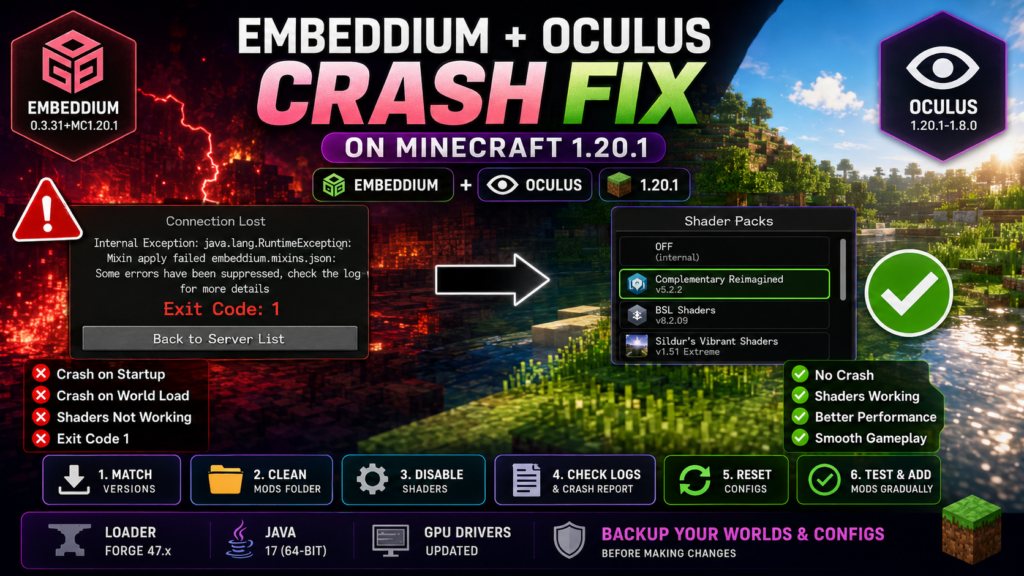
Embeddium and Oculus crashing on Minecraft 1.20.1 usually occurs when the installed Embeddium, Oculus, Forge, Java, shader pack, or another rendering-related mod does not match the rest of the profile. The crash may happen during startup, while joining a world, after enabling shaders, or when loading particular blocks, entities, or modded visual effects.
The official Minecraft 1.20.1 listings identify Embeddium 0.3.31+mc1.20.1 and Oculus 1.20.1-1.8.0 as client-side releases supporting Forge and NeoForge. Oculus also lists Embeddium as required content. This means the projects are intended to work together, but it does not guarantee that every shader, addon, graphics driver, or modpack combination will be compatible.
Quick Embeddium and Oculus Crash Fix
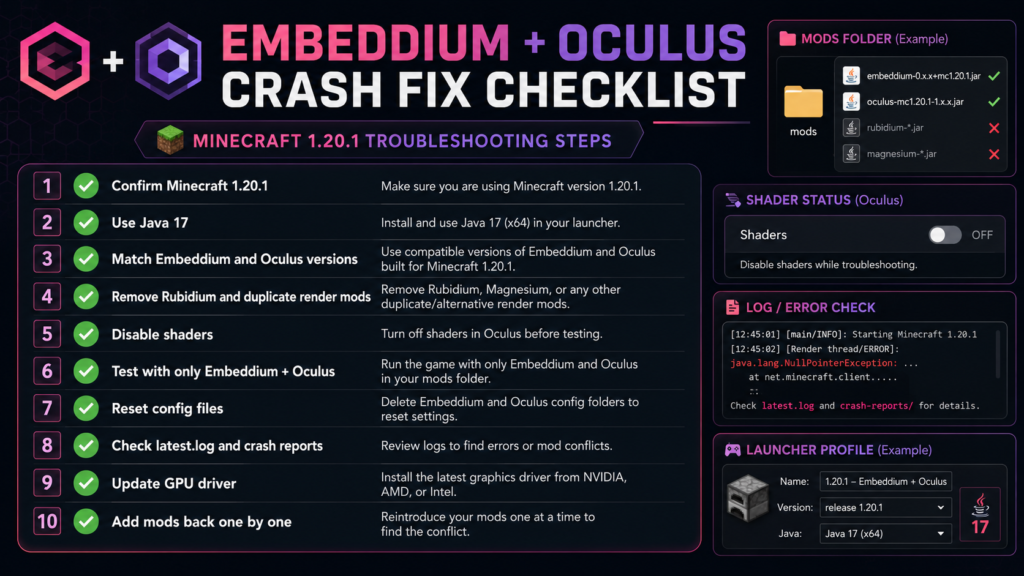
Try these steps in order:
- Close Minecraft and the launcher.
- Back up the profile, worlds, shaders, and configuration files.
- Confirm that the game is exactly Minecraft 1.20.1.
- Confirm that the profile uses Forge or the intended NeoForge build.
- Use 64-bit Java 17 for a Forge 1.20.1 profile.
- Keep only one Embeddium JAR and one Oculus JAR.
- Remove Rubidium, OptiFine, Indium, Iris, and duplicate renderers.
- Remove Oculus Particle Fix on Minecraft 1.20.1.
- Disable the active shader pack.
- Test with only Embeddium and Oculus installed.
- Reset shader and Embeddium configuration files.
- Update the graphics driver.
- Read
latest.log,debug.log, and the latest crash report. - Add other mods back gradually after the clean profile works.
Do not downgrade or update several components simultaneously. Make one meaningful change, launch Minecraft, and record the result.
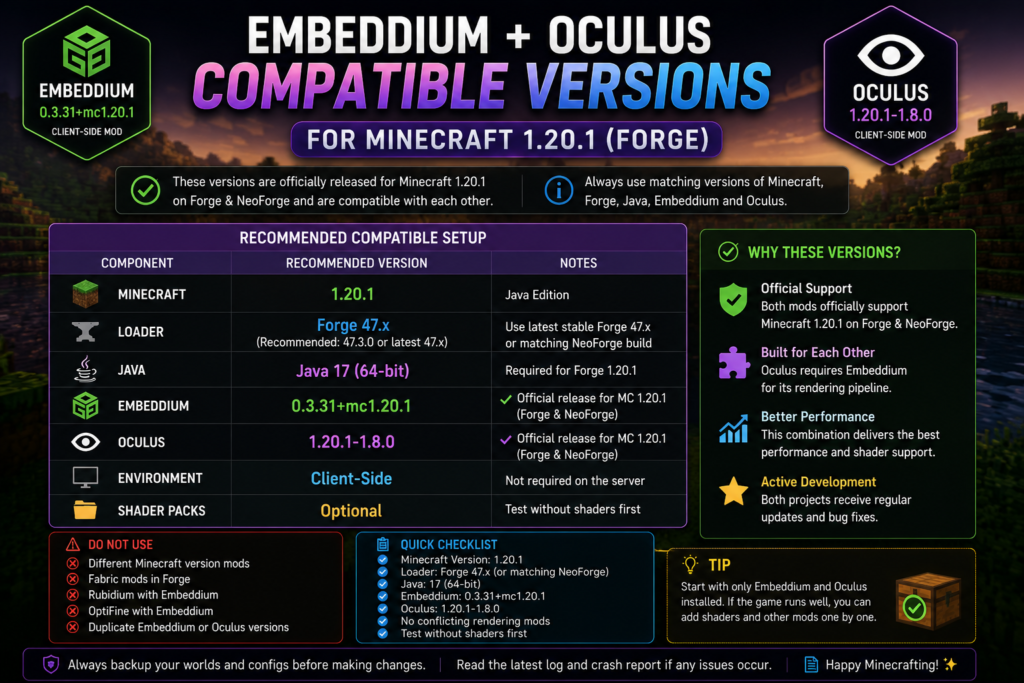
Recommended Base Setup
Start troubleshooting with this simple combination:
| Component | Recommended check |
|---|---|
| Minecraft | Java Edition 1.20.1 |
| Loader | Forge 47.x or matching supported NeoForge build |
| Java | 64-bit Java 17 |
| Embeddium | 0.3.31+mc1.20.1 |
| Oculus | 1.20.1-1.8.0 |
| Shader pack | Disabled for first test |
| Environment | Client-side |
| Other render mods | Temporarily removed |
| Duplicate files | None |
The official Oculus 1.8.0 release supports Minecraft 1.20.1 on Forge and NeoForge and requires a compatible Embeddium installation. The corresponding Embeddium 0.3.31 release also supports Minecraft 1.20.1 on Forge and NeoForge.
Treat these versions as the clean test combination shown by current official listings. A large existing modpack may still require a different previously tested combination, so back up the instance before replacing files.
What Does the Crash Look Like?
The problem can appear in several ways:
| Crash stage | Possible indication |
|---|---|
| During launcher startup | Java, loader, or file-version mismatch |
| During Forge loading | Mixin or rendering-mod conflict |
| Main menu loads, world crashes | Shader, entity, block, or world-rendering conflict |
| Shader activation crashes | Oculus or shader-state problem |
| Screen freezes after joining | Rendering addon or mod interaction |
| Invisible terrain or blocks | Driver, Oculus, shader, or translucency issue |
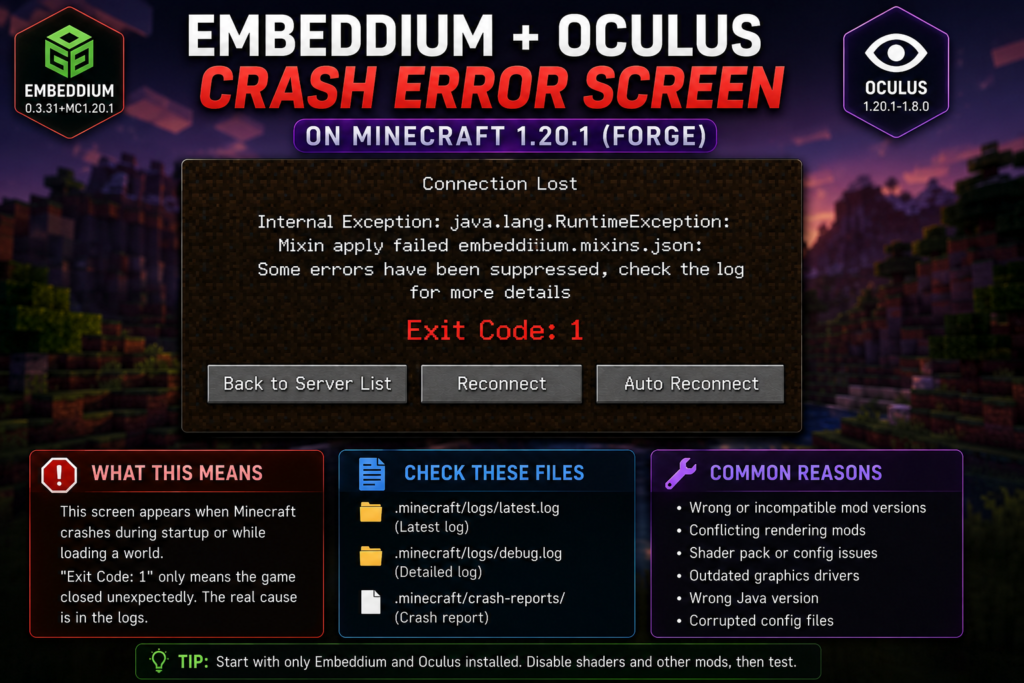
| Launcher shows Exit Code 1 | The real reason is inside the logs |
| No crash report appears | Check latest.log and debug.log |
Public issue reports include crashes after entering a world, crashes after switching shaders back on, and visual failures involving invisible terrain. These reports demonstrate possible failure patterns, but each report represents a particular mod list and computer rather than a universal Oculus–Embeddium bug.
Common Causes and Fixes
1. Embeddium and Oculus Versions Do Not Match
Oculus relies on rendering systems provided by Embeddium. An older Oculus release may expect internal Embeddium code that changed in a newer release, or an older Embeddium build may not include behavior expected by a newer Oculus version.
The official Oculus history shows that earlier releases specifically added support for particular Embeddium versions. For example, Oculus 1.6.15 added support for Embeddium 0.3.1, while Oculus 1.6.15a added support for Embeddium 0.3.3. This shows why matching the rendering stack matters.
Fix
Confirm these values:
Minecraft: 1.20.1
Loader: Forge or matching NeoForge
Embeddium: Minecraft 1.20.1 build
Oculus: Minecraft 1.20.1 build
Java: 17 for Forge 1.20.1
Do not use:
- Oculus for Minecraft 1.19.2
- Embeddium for Minecraft 1.21.1
- Fabric Embeddium inside a Forge profile
- A Forge mod inside Fabric
- A renamed JAR pretending to support another version
2. Duplicate Embeddium or Oculus Files
Two Embeddium versions or two Oculus versions can cause duplicate-mod errors, class conflicts, or unpredictable loading behavior.
Incorrect example:
mods/
├── embeddium-0.3.25+mc1.20.1.jar
├── embeddium-0.3.31+mc1.20.1.jar
├── oculus-mc1.20.1-1.7.0.jar
└── oculus-mc1.20.1-1.8.0.jar
Correct clean test:
mods/
├── embeddium-0.3.31+mc1.20.1.jar
└── oculus-mc1.20.1-1.8.0.jar
Fix
- Close Minecraft.
- Open the active profile’s
modsfolder. - Search for
embeddium. - Search for
oculus. - Remove all outdated duplicates.
- Keep one matching version of each mod.
- Launch again without shaders.
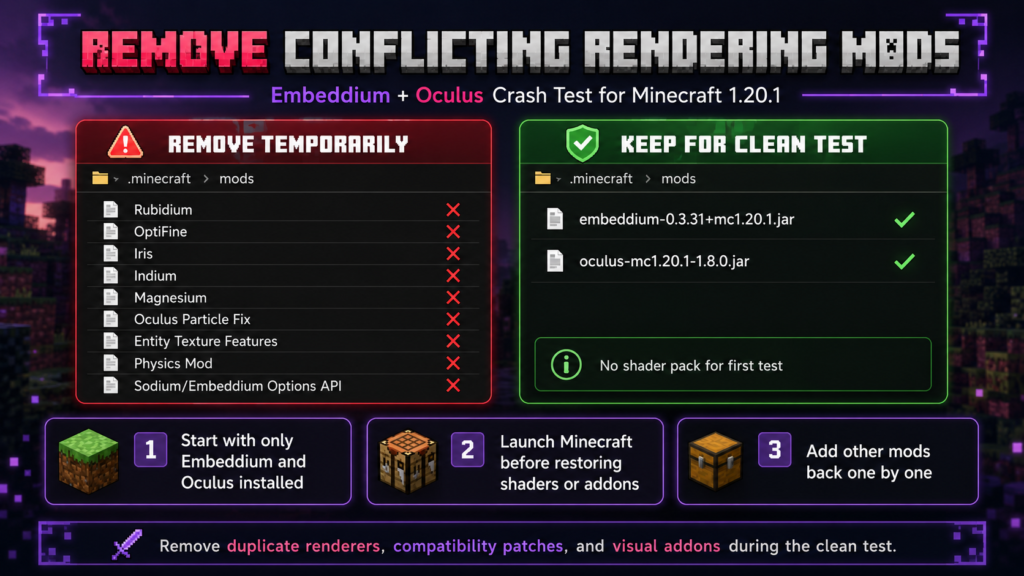
3. Rubidium, OptiFine, Iris, or Indium Is Installed
Embeddium should not be combined with Rubidium because both replace overlapping parts of Minecraft’s renderer. Embeddium’s official 1.20.1 release page lists Rubidium as a known incompatibility.
Oculus already provides the Forge-oriented shader system for this setup. Installing another shader renderer, such as Iris or OptiFine, can result in overlapping modifications to Minecraft’s graphics pipeline.
Remove while troubleshooting
Rubidium
OptiFine
Iris
Indium
Magnesium
Other complete renderer replacements
Duplicate shader loaders
Keep only:
Embeddium
Oculus
Required loader files
4. Oculus Particle Fix Is Installed
The Oculus Particle Fix project explicitly warns that it is not required for newer Minecraft 1.20.1 Oculus versions and may itself cause a crash.
Fix
Remove files with names similar to:
oculus-particle-fix
iris-particle-fix
particle-fix-oculus
Restart Minecraft with only the official Oculus file installed.
Do not install random compatibility patches unless their documentation clearly supports your exact Oculus, Embeddium, Minecraft, and loader versions.
5. Shader Pack Causes the Crash
A shader can contain features, expressions, or rendering assumptions that do not work correctly with the selected Minecraft, Oculus, or mod combination.
A reported Minecraft 1.20.1 issue caused the game to crash after shaders were disabled and then re-enabled, resulting in a buffer-mapping error. This confirms that shader switching itself can be part of the failure path in some setups.
Fix
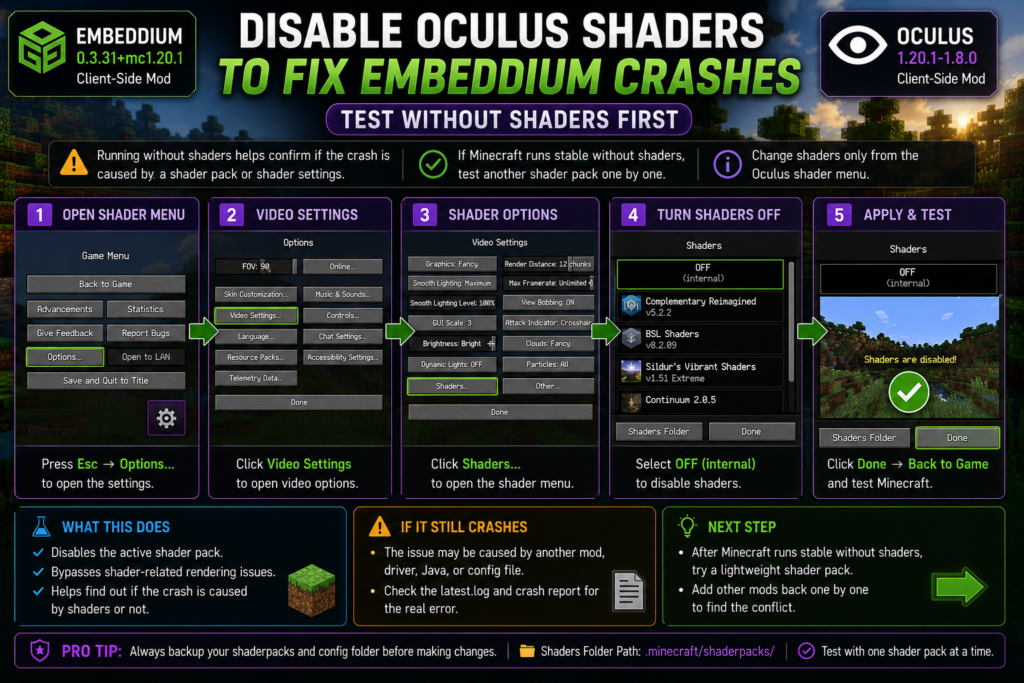
- Launch Minecraft without an active shader.
- Open the shader selection menu.
- Set shaders to Off.
- Close Minecraft normally.
- Rename the current
shaderpacksfolder temporarily. - Launch again.
- Test a lightweight shader only after the game is stable.
Do not repeatedly toggle a shader using a keyboard shortcut while investigating a crash. Return to the menu and change the shader once.
6. Shader Configuration Is Corrupted
A shader may keep cached or saved configuration values after an update. Those settings can conflict with a newer shader or Oculus build.
Safe reset
- Close Minecraft.
- Back up the profile directory.
- Back up the
shaderpacksfolder. - Locate Oculus or shader-related files in
config. - Rename the related files by adding
.old. - Launch without a shader.
- Allow fresh settings to be generated.
- Reconfigure the shader gradually.
Do not delete unrelated Forge or mod configuration files.
7. Distant Horizons Version Conflict
Oculus 1.8.0 lists improved compatibility with Distant Horizons 2.2 and newer among its release changes. This means older Oculus versions may be unsuitable for newer Distant Horizons builds.
Fix
When Distant Horizons is installed:
- Test Embeddium and Oculus without Distant Horizons.
- Confirm that Minecraft launches.
- Check that the Distant Horizons build supports Minecraft 1.20.1.
- Use the Oculus build whose notes support that Distant Horizons generation.
- Reinstall Distant Horizons only after the basic shader setup works.
Do not assume that every Distant Horizons, shader, Oculus, and Embeddium version can be mixed freely.
8. Physics or Entity-Rendering Mod Conflict
Public issue reports show crashes involving combinations such as Embeddium, Oculus, and a physics mod, as well as heavily modded profiles containing entity-model, entity-texture, Flywheel, Create, and renderer integrations. These reports do not prove that every listed mod is incompatible; they show why a clean two-mod test is necessary.
Temporarily remove
- Physics mods
- Entity Texture Features
- Entity Model Features
- Sodium or Embeddium Options API addons
- Dynamic lighting mods
- Connected-texture integrations
- Better Clouds
- Custom entity renderers
- Flywheel compatibility patches
- Create rendering patches
- Shader enhancement addons
Test each one again after Embeddium and Oculus work by themselves.
9. “Embeddium Instance Tainted by Mods”
The log may display something similar to:
Embeddium instance tainted by mods:
[oculus, entity_texture_features, sodiumoptionsapi]
This is not a malware warning. It means other mods are modifying or integrating with parts of the renderer used by Embeddium. A public issue involving Oculus, Embeddium, and several additional mods showed that the clean Oculus-plus-Embeddium combination did not reproduce the crash, suggesting that another mod in the profile was involved.
Fix
- Copy every mod name listed in the tainted warning.
- Remove those mods temporarily.
- Keep Embeddium and Oculus only.
- Launch Minecraft.
- Add the listed integrations back one at a time.
- Stop when the crash returns.
The tainted list is a troubleshooting clue, not automatic proof that each named mod is broken.
10. Wrong Java Version
Minecraft Forge 1.20.1 normally uses 64-bit Java 17. The official Forge 1.20.1 documentation is based on Java 17.
Check Java
Open Command Prompt:
java -versionA suitable result should begin with:
17When Minecraft Launcher uses a manually configured Java path, open the profile settings and verify that it points to the intended Java 17 executable.
11. Forge Version or Loader Mismatch
The current official Forge 1.20.1 file page lists multiple 47.x builds. A modpack may have been tested on a particular Forge release, so installing the numerically newest build is not always the correct troubleshooting move.
Fix
- Check the modpack’s required Forge version.
- Use a Forge build intended for Minecraft 1.20.1.
- Avoid mixing Forge and NeoForge JARs.
- Roll back Forge when the crash began immediately after a loader update.
- Test loader changes in a separate game directory.
12. Graphics Driver or Wrong GPU
Oculus and Embeddium interact directly with the rendering pipeline. A damaged graphics driver, unsupported OpenGL behavior, or Minecraft using the wrong graphics adapter can produce crashes, freezes, transparent terrain, or shader failures.
A reported clean Minecraft 1.20.1 installation using Embeddium 0.3.31 and Oculus 1.8.0 experienced invisible terrain, showing that some visual failures may require driver and system-level investigation rather than only mod removal.
Fix
Update the driver through:
- Intel
- AMD
- NVIDIA
On laptops, open:
Windows Settings
→ System
→ Display
→ Graphics
Set Minecraft’s Java executable to:
High PerformanceRestart the computer and test without shaders.
13. Incorrect Game Directory
The files may be placed inside:
.minecraft/modswhile the active Forge profile uses a separate game directory.
Fix
In Minecraft Launcher:
- Open Installations.
- Edit the Forge 1.20.1 profile.
- Find Game Directory.
- Open that exact folder.
- Place Embeddium and Oculus inside its
modsfolder. - Place shaders inside its
shaderpacksfolder.
Complete Step-by-Step Fix
Step 1: Back Up the Profile
Copy these folders:
saves
mods
config
shaderpacks
resourcepacks
logs
Also save screenshots of the current mod list and version numbers.
Step 2: Create a Clean Forge 1.20.1 Profile
Create a separate launcher profile using:
Minecraft 1.20.1
Forge 47.x
Java 17
Choose a new game directory:
D:\Minecraft\Embeddium-Oculus-TestLaunch the empty Forge profile once and close it at the main menu.
Step 3: Install Only Embeddium and Oculus
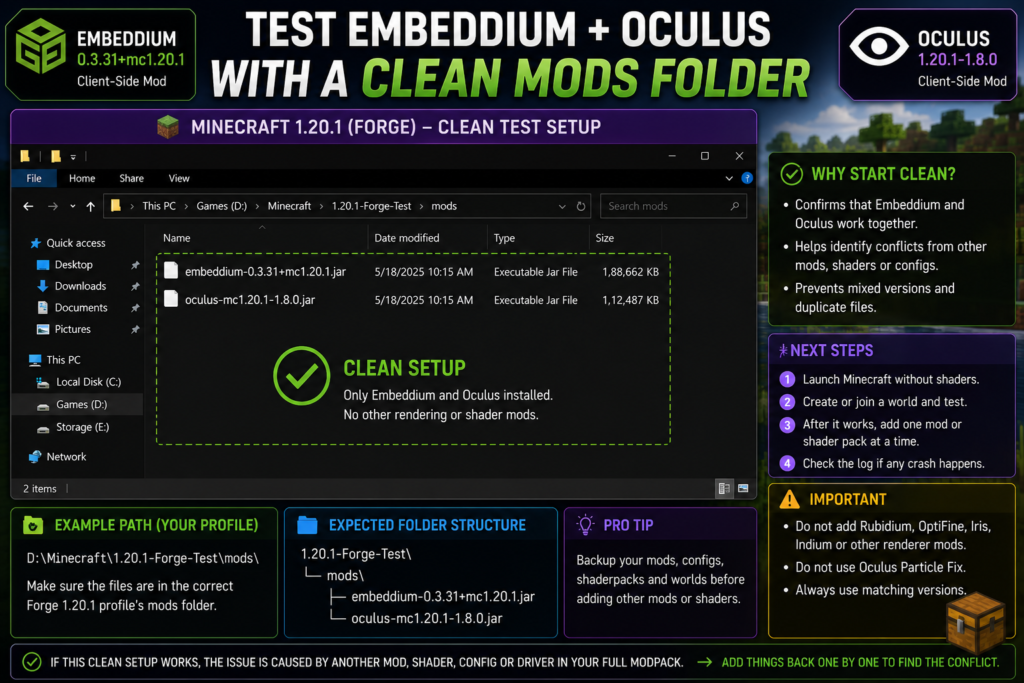
The clean mods folder should contain:
mods/
├── embeddium-0.3.31+mc1.20.1.jar
└── oculus-mc1.20.1-1.8.0.jar
These two releases are officially listed for Minecraft 1.20.1, Forge/NeoForge, and client-side use. Oculus lists Embeddium as required content.
Do not add a shader pack yet.
Step 4: Launch Without Shaders
Launch the profile and check:
- Does the main menu open?
- Does a world load?
- Can you move through several chunks?
- Is the terrain visible?
- Does Minecraft remain open for several minutes?
Result A: It launches correctly
The base Embeddium–Oculus combination works on the test profile. A shader, addon, configuration, or another mod from the original profile is likely involved.
Result B: It still crashes
Check:
- Java version
- Loader build
- Correct Minecraft release
- Duplicate files
- Graphics driver
- Active GPU
latest.logdebug.log- Crash report
Step 5: Test One Shader Pack
Copy one shader pack into:
shaderpacks/Launch Minecraft, select the shader from the menu, and test in a new world.
Do not initially use:
- Several shader packs
- Custom shader compatibility patches
- Dynamic-lighting extensions
- High-resolution resource packs
- Distant Horizons
- Physics mods
Step 6: Add Other Mods Gradually
Use the half-split method:
- Divide the remaining mods into two groups.
- Add the first group.
- Launch Minecraft.
- When it crashes, remove the working half.
- Split the crashing group again.
- Repeat until the conflicting file is identified.
Step 7: Reset Oculus, Shader, and Embeddium Configs
Back up and rename related configuration files.
Example:
oculus.propertiesbecomes:
oculus.properties.oldUse the same approach for clearly identified Embeddium or shader configuration files.
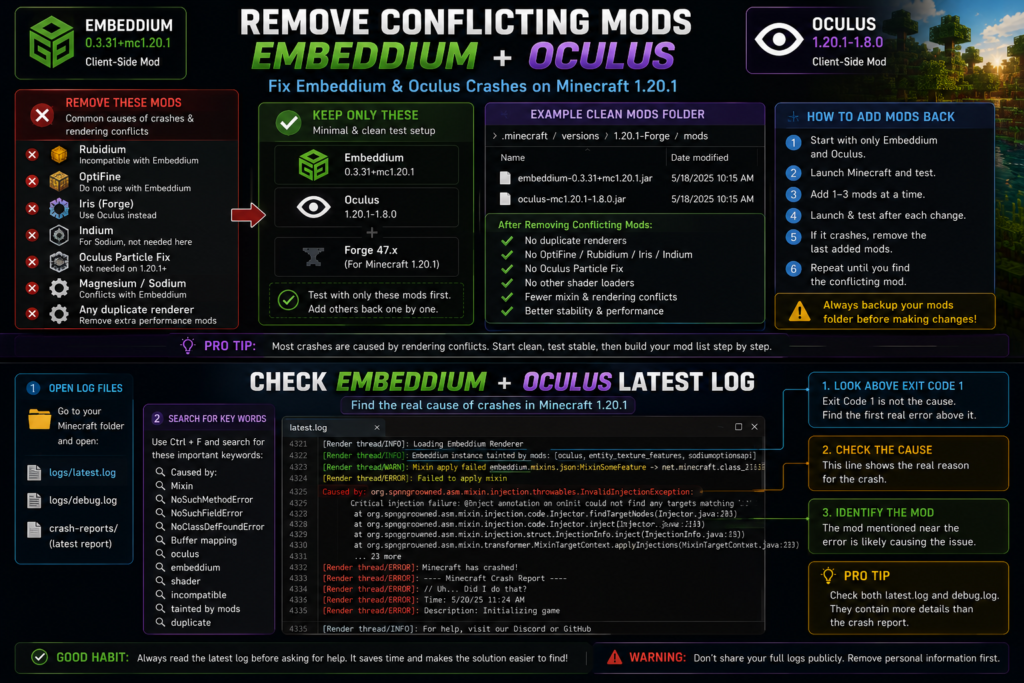
Step 8: Read the Latest Log
Open:
logs/latest.log
logs/debug.log
crash-reports/
Search for:
Caused by:
Mixin apply failed
NoSuchMethodError
NoSuchFieldError
NoClassDefFoundError
Buffer mapping is already disposed
Unknown variable
oculus
embeddium
shader
incompatible
duplicate
tainted by mods
The final Exit Code 1 line is not the root cause. Look upward for the first meaningful error and the mod name closest to it.
Common Error Messages
Exit Code 1
Exit Code 1 only indicates that the game process stopped.
Check:
- Java 17
- Forge version
- Matching Embeddium and Oculus
- Duplicate files
- Rendering conflicts
- Latest log
- Crash report
Mixin Apply Failed
This usually indicates that two mods are attempting incompatible changes to the same class, or that an addon expects a different version of another mod.
Remove the mod named around the mixin failure and retest the clean profile.
NoSuchMethodError or NoSuchFieldError
These errors often indicate that one installed mod expects a method or field that is missing from the loaded version of another mod.
Match the versions of:
- Embeddium
- Oculus
- Forge
- Shader addons
- Rendering APIs
- Compatibility patches
Buffer Mapping Is Already Disposed
This exact error was reported when shaders were switched off and back on in an Embeddium–Oculus Minecraft 1.20.1 setup. Avoid rapid shader toggling and test a clean configuration before assuming hardware failure.
Unknown Variable in Shader Expression
A reported Oculus 1.20.1 crash involved an unsupported biome variable associated with content from a newer Minecraft release. The issue indicated that another part of the mod list was passing information not expected by the 1.20.1 Oculus environment.
Check:
- Shader pack version
- Connected-texture mods
- Cross-version content
- Sinytra or Fabric compatibility layers
- Datapacks made for newer Minecraft versions
Invisible Blocks or Transparent Terrain
Test:
- Shaders Off
- Default resource pack
- Embeddium alone
- Embeddium plus Oculus
- Updated graphics driver
- Different Oculus or Embeddium combination only after backup
- Fresh configuration files
A public issue documents transparent terrain with Embeddium 0.3.31 and Oculus 1.8.0, but it remains an issue report rather than a confirmed universal fault or guaranteed solution.
Safe Rollback Method
When the crash began after an update:
- Copy the complete working profile.
- Identify the last updated file.
- Restore only that file’s previous version.
- Keep Minecraft, loader, and other mods unchanged.
- Test the same world.
- Read the log before rolling back another component.
A public Oculus issue reported that removing Oculus or downgrading Embeddium changed the result, while the clean Embeddium-plus-Oculus profile did not reproduce the same crash. This is why a rollback should be treated as a diagnostic test rather than a permanent universal recommendation.
Frequently Asked Questions
Can Embeddium and Oculus work together on Minecraft 1.20.1?
Yes. Oculus 1.20.1-1.8.0 officially lists Embeddium as required content, and both projects provide client-side Minecraft 1.20.1 releases for Forge and NeoForge. Other mods, shaders, configurations, or drivers can still create compatibility problems.
Which Embeddium version should I use with Oculus 1.8.0?
The official Embeddium 1.20.1 listing provides version 0.3.31, while Oculus 1.8.0 requires a compatible Embeddium version. Start with the current official Minecraft 1.20.1 releases in a clean profile and adjust only when your modpack has documented requirements.
Why does the game work with Embeddium but crash after Oculus is added?
The cause may be an Oculus version mismatch, shader configuration, graphics-driver issue, shader addon, or another rendering mod. Test Embeddium and Oculus together without shaders or other mods.
Should I install Rubidium with Embeddium and Oculus?
No. Embeddium’s official 1.20.1 release lists Rubidium as incompatible. Keep only Embeddium as the rendering-performance mod.
Do I need Oculus Particle Fix?
Not for current Minecraft 1.20.1 Oculus releases. The fix project warns that using it with newer 1.20.1 Oculus versions may cause a crash.
Can a shader pack cause the startup crash?
Yes. Shader packs and shader-related addons can use rendering behavior that conflicts with a particular Oculus, Embeddium, or Minecraft version. Disable the shader and test the base mods first.
Why does Minecraft crash when I turn shaders back on?
A Minecraft 1.20.1 issue report documented a crash after shaders were toggled off and then back on. Change shaders through the menu, restart the game when necessary, and test with fresh configuration files.
What does “Embeddium instance tainted by Oculus” mean?
It means Oculus or another listed mod is integrating with parts of Embeddium’s renderer. It does not automatically prove Oculus is the sole cause. Test the listed integrations in a clean profile.
Can Distant Horizons crash Oculus?
Version mismatch can cause problems. Oculus 1.8.0 specifically includes compatibility changes for Distant Horizons 2.2 and newer, so older Oculus builds may not be appropriate for those Distant Horizons releases.
Which Java version should Minecraft 1.20.1 Forge use?
Use 64-bit Java 17 for a normal Forge 1.20.1 setup.
Should Oculus be installed on the server?
Oculus and Embeddium are listed as client-side mods. Install them in the player’s local profile unless a specific server or modpack provides different instructions.
Why does the clean profile work but my modpack crashes?
Another mod, shader, compatibility layer, or configuration in the original profile is interacting with the rendering stack. Use the half-split method to identify the smallest mod group that reproduces the crash.
Conclusion
Embeddium and Oculus crash problems on Minecraft 1.20.1 are best fixed by starting with a clean Forge profile, matching the Minecraft, Java, Embeddium, and Oculus versions, disabling shaders, removing duplicate or overlapping renderers, resetting configuration files, and reading the latest log.
Begin with only Embeddium and Oculus installed. Once the game and a test world load correctly, add one shader and then restore the remaining mods gradually. Avoid Rubidium, Oculus Particle Fix, duplicate renderers, and undocumented compatibility patches.